Reading Time: 3 minutes

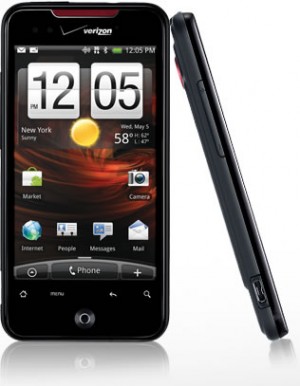
Android continues to mature in the smartphone market and the HTC Incredible on the Verizon network gives the Apple iPhone a whole host of reasons to take notice. First and foremost the HTC Incredible gets a signal, an increasingly difficult task at least for myself and fellow iPhone/AT&T users in our neck of the woods (from time-to-time my “neck of the woods” includes New York City).

A fast and fully-featured Smartphone, the HTC Incredible works extremely well for both voice and data. It’s a light, sleek phone you barely notice in your pocket, yet is packed with power and features that surpassed any preconceived notions I had going into the tests.

The iPhone continues to be the benchmark for Smartphones and happens to be the smartphone I pay dearly for month-after-month. While Apple prepares to roll-out the iPhone 4 on 24-June, 2010 with a number of new features, I may very well be a Verizon customer before then. The HTC Incredible on the Verizon network out-performed my iPhone in coverage, voice clarity and network speed (browsing) and already includes multi-tasking and folders (2 examples of what to expect in the new iPhone iOS 4). If the Incredible provided a wi-fi hotspot or tethering (something out-of-the-box and not rooting or installing anything), I would have already made the leap.

Interface
The HTC Incredible’s interface takes some getting used to. It wasn’t obvious to me how to quit an application and stop it running in the background. Not only does this tax the processor, but when I finished testing Skype (great sound quality over the 3G network in my tests by the way), I inadvertently left the app running and kept myself logged-in for the rest of the day.

HTC’s updated ‘Sense’ user interface, while polished (thanks in large part to a powerful 1GHz processor that can support it), is still not as natural as Apple’s interface in my opinion. I do like the ability to view the separate screens as cards and can quickly jump between with smooth transitions. But in terms of overall ease-of-use, or intuitiveness, the iPhone still has it.

Applications
The Android Marketplace is loaded with free and paid alternatives similar to what you can find in Apple’s App store. Apple boasts roughly four times the number of apps as android (reportedly somewhere around 50,000 apps). While many people don’t like that Apple controls what can and can’t appear in the App Store, it does add a layer quality control. Third party apps are probably the leading cause for Android crashes on what is otherwise a stable OS.

Smartphone Performance
Following are notes about the Incredible’s performance in key areas to consider for any smartphone…
Voice: High quality and with far less dropped calls and a greater service area than Im used to (on existing 3GS iPhone/AT&T)
Data: Fast web browsing. Gmail and Exchange support
Camera: 8-megapixel autofocus camera with video and LED flash
Music: Sounds OK through speaker and very good with headphones (headphones are also required to use the FM radio app)
Display: 3.7-inch AMOLED (800 x 480 pixels) is bright and very vivid
Interface: Sense; Improved over earlier Android units tested, but still not as intuitive as the iPhone
Storage: 8GB expandable to 16GB with microSD card (sold separately)
Speed: Fast processor (1-GHz SnapDragon processor)
Battery: Battery will get most users through the day, but for very active users (music, Facebook, talk, numerous Apps, etc) you will want to either bring along the cable, or balance-out your day better

Price: $199 purchased online with 2-year Verizon contract

Posted by: Lawrence

Reading Time: < 1 minute

Last minute shopping for Mother’s Day? There are a number of gadgets out there for the tech-savvy mother and at a variety of price points depending on your budget. ABC News has done a nice job compiling a list of gadgets for Moms, proving that Dad’s aren’t the only ones looking to geek-out. In fact it’s estimated that more than $906m will be spent on consumer electronics for Mother’s Day this year.

Check out the video below for demonstrations and descriptions of some of the hottest Mother’s Day gadgets this year, including…

Eye-Fi 4GB WiFi – $49.99
Automatically uploads to photo sharing site (e.g. Flickr) and keep SD cards free for new pictures

Kodak Digital Picture Frame – $129 (Pulse)
Email pictures to the frame’s personal email address – couldn’t be easier

Asus Skype Video Phone Touch – $199
No computer required, plug it in, attach it to your home network and enjoy

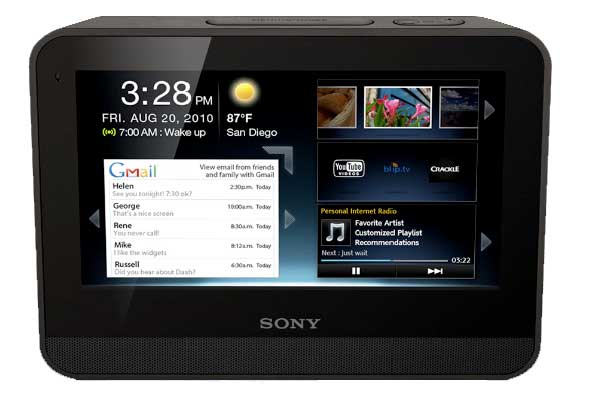
Sony dash – $199
Also hooks into home WiFi. Provides news, weather, traffic and more. The ideal alarm clock, you can link to the Pandora music site to wake-up to your favorite music.

Posted by: Jason

Reading Time: < 1 minute

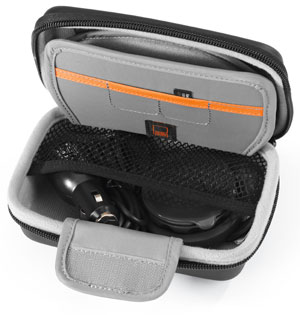
Given the cost of portable gadgets, it’s a good idea to protect your investment with a well constructed and functional case. Writing about a case in a tech article may seem a stretch to some, but the Lowepro 4.3 Navi Shield falls squarely under the category of gear with it’s hard, molded-foam exterior and soft Nylon Tricot 200d lining.

The 4.3 Navi Shield provides the necessary protection for my Garmin Nuvi and the compact size allows the case to be hidden in the center console (or a glove box). It also offers space for the charger cord and two extra SD cards and has a built-in microfiber cloth to clean the delicate touch screen.

It weighs very little (0.2lbs/0.1kg), so bringing the Nuvi on flights has helped saved some money when renting a car (and not needing the GPS they offer). If you own a 3.5 to 4.3-in portable navigation system consider the Lowepro 4.3 Navi Shield.

Size (Interior):
5.1W X 0.9D X 3.1H in./
13.0 X 2.3 X 8.0 cm

Size (Exterior):
6.5W X 2.4D X 4.5H in./
16.5 X 6.0 X 11.5 cm

Posted by: Lawrence

Reading Time: 3 minutes

I was an early iPhone adopter – before the App store and just stoked on the idea that I had a cool phone and a way to browse the web at decent speeds on a decent-sized screen. The initial gee-whiz of what could be done on the iPhone was soon overshadowed by what it couldn’t do and the lack of certain features continue to stick-out.

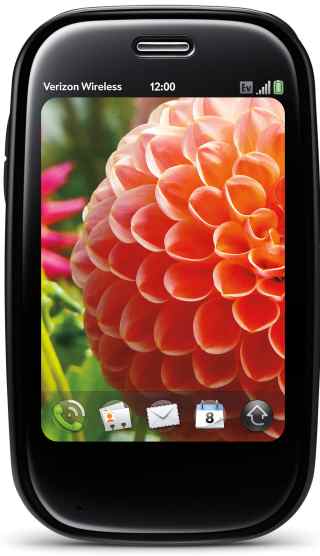
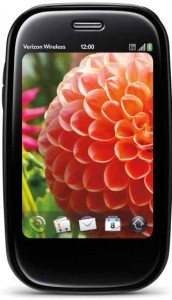
As fast as it looks, the Palm Pre Plus

By far the most glaring omission with the iPhone is the inability to tether it to a computer. While this isn’t a limitation of the iPhone itself (it’s more like a disabled feature) it leaves many, including myself, looking for alternative solutions. The Palm® Pre™ Plus not only let’s you tether (via Bluetooth), but Palm incorporated a mobile hotspot into the Pre which allows as many as 5 concurrent users to jump online.

The Pre is a sleek looking slider phone (keypad slides-out from the bottom) with a built-in camera and flash. It feels nice in your hand and slips easily into your front pocket. It’s so sleek in fact, that it took me a while to find the USB port to charge the phone! I also puzzled over how to close apps (you flick them upwards) and the small keypad gave me fits. When I first receive a gadget I purposely avoid the manual to see how intuitive it is and I have to say the Palm Pre Plus is miles from Apple in regards to ease-of-use.

Voice: In my tests the Palm® Pre™ Plus on the Verizon network performed well, with good sound clarity and clear voice transmission. To dial numbers you use the touchscreen and not the tiny keypad. The Pre worked everywhere I tried it, including spots my iPhone loses coverage. AT&T recently announced plans to spend $18 – $19 billion on network upgrades, but there is far less AT&T coverage in my area than Verizon.

Data: The Palm Pre takes advantage of Verizon EV-DO Rev. A and offers speeds equal or greater than speeds enjoyed on an iPhone 3GS. EV-DO Rev. A data can peak at 3000 kbps, but on average users get around 600Kbps-1400Kbps.

In Rhode Island I enjoyed, on average, 1.50Mb/s download and 0.52Mb/s upload. And in New York City the rates were 1.00Mb/s download and 0.21Mb/s upload. This means in RI I can expect to download a 5MB MP3 file in about 25 seconds, or a 35MB video in 3 minutes – not bad!

If you’re looking for a phone that is very slick looking, offers reliable voice and fast data (for you and up to 5 friends) and you have the patience to read the manual or play with it enough to learn how to use it, then the Palm Pre is a wise choice. Full retail price is listed at $599.99, but with 2yr contract the Palm Pre Plus can be yours for $49.99 (early termination fees do apply). This phone also requires a data package ($29.99 or higher per month). Visit Verizon Wireless for more information.

Specs:
Battery Usage: Up to 330 minutes talk time / Up to 350 hours standby
Dimensions: 3.9″ (H) x 2.3″ x (W) x 0.67″ (D)
Weight: 4.89 oz.
Display: 3.1″(HVGA 480 x 320), 24 bit TFT
Memory: 16GB Flash/512 RAM
Bluetooth® Wireless Technology–(V 2.1+EDR)
3 Megapixel camera with flash
Palm webOS™ platform
Wi–Fi Ready (802.11 b/g)
Music Player for MP3, AAC, AAC+, WAV, AMR, QCELP
Email: Exchange ActiveSync support

Posted by: Lawrence

Reading Time: < 1 minute

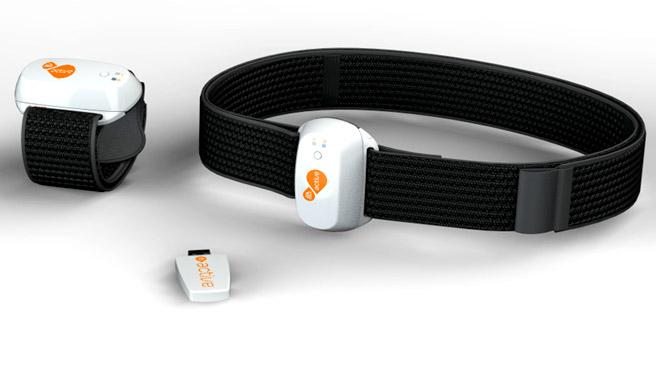
EA has announced EA SPORTS Active 2.0 (working title). Scheduled for release this fall, EA SPORTS Active 2.0 is expected to offer a wireless heart rate monitor, arm and leg accelerometers for use with PlayStation 3, Wii, iPhone and iPod touch.

Users can track exertion in real-time with an onscreen display and also share workouts with other EA SPORTS Active users online. Sharing fitness results, interacting with workout groups and sending messages to other users is expected to keep users inspired and engaged.

PlayStation 3 users will also benefit from the ability to download new workouts and exercises to their internet-connected consoles. Other online features include EA’s’ total body conditioning’ workouts, progressive exercises in a three-phase, nine-week program intended to help provide a fitness road-map while motivating users to stay on track with their fitness goals. An EA SPORTS Active personal trainer can help walk users through a workout and provide continued encouragement with feedback to ensure an optimal workout experience.

Posted by: Lawrence

Reading Time: 2 minutes

Interval training is increased intensity for a given activity (lifting, running, rowing, cycling) for a measured amount of time, followed by a reduced level activity for a measured amount of time. Typically done in sets, interval training can be anaerobic – fat burning high intensity interval training (HIIT) typically focused on starving larger muscle groups of oxygen – or aerobic, where low to moderate intensity is used for a longer period of time, allowing muscles to ‘breathe’ and build stamina.

Both anaerobic and aerobic exercise are beneficial and interval training is a great tool to realize those benefits, while at the same time adding a new dimension to workouts to keep them interesting.

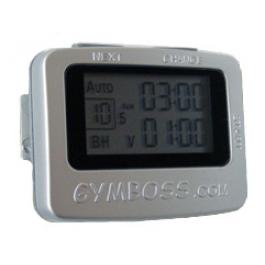
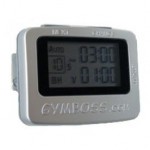
Measuring intervals is easy, but too often it distracts you from your chosen exercise. I’ve been in all-out sprints with my left arm unnaturally poised in front of me so I could read my watch (with difficulty and added risk). Others rely on a partner’s shouts to let them know when to speed up, slow down or stop. A small device called the GymBoss (1 3/4 x 2 1/4 inches) is a lightweight, inexpensive ($20USD) and eliminates the need to focus on anything else but your workout. Clip it to your belt, stick it in your pocket or place it on a shelf for indoors workouts – it’s barely noticeable until a shrill beep, strong vibration or both effectively alert you (to be honest the first time it beeped it startled the hell out of me).

The GymBoss easily satisfies what I would consider my basic need for measuring intervals while running. Others use it to time rounds (up to 99 can be programmed) on the heavy bag or for cycling, weight lifting and other pursuits. Other GymBoss features include…

  • One or two different time intervals from 2 seconds to 99 minutes
  • Auto mode / repeat through intervals
  • Manual mode / countdown timer
  • Stopwatch

The manual is a small double-sided slip of paper they package under the belt clip. If you’re just getting started with interval training and want more information, check out some of these sites so the directions make more sense and you can program the GymBoss accordingly…

http://www.intervaltraining.net/
http://en.wikipedia.org/wiki/Interval_training
http://sportsmedicine.about.com/od/tipsandtricks/a/Intervals.htm

For $20USD you really can’t beat the GymBoss, it does everything it says it does and does it well.

Posted by: Lawrence

Reading Time: 2 minutes

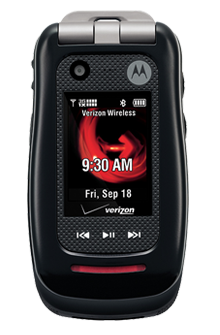
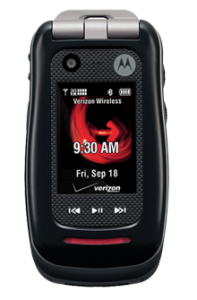
Not everyone needs an iPhone or even a smartphone for that matter. For many, the only functionality needed is good voice quality and the only feature required is reliability. Enter the Motorola Barrage, both uniquely feature-rich as well as durable and providing what I perceived to be above-average voice quality.

Ideally suited for those who work or play outdoors, the Barrage meets or exceeds military specifications for dust, shock and weather. In fact, the Barrage is waterproof in up to one meter of water and submerged for up to 30 minutes. I threw it in the snow, plopped it in a glass of water, took it to the beach and – the test of all tests – let my 6-year-old play with it. Beyond the tested toughness, the Barrage feels like a solid piece of tech, weighing 4.2 ounces and handsomely constructed using black textured rubber and plastic.

Offered by Verizon Wireless for $129.99 (with $50 online discount), the push-to-talk capable Barrage’s 383 minutes of talk-time competes for battery life with a host of features including a 2 megapixel camera (non-camera version also available), music player, bright external 120 x 160 display and TFT internal display (176 x 220).

VCAST and VZ Navigator service are available for additional monthly fees and the streaming in my area was admirable. In my opinion however, the screen size on flip phones in general renders services such as these to be more of a gimmick than useful.

If watching video on the go or you’re frequently going to use the navigation service, you’re better off with smartphone. If you’re the outdoorsy type, or even clumsy, the Motorola Barrage is your ideal phone. With quality construction, a host of features, Verizon’s unparalleled coverage and above-average voice quality, the Motorola Barrage is ready to go to work for you.

Reading Time: 2 minutes

FLowTV
The commercial: Great montage of iconic moments captured on TV over the decades.

The product: FloTV, “a dedicated broadcast network of high quality video that emulates broadcast television.” FlowTV sells a 3.5″ touchscreen screen device with 5 hours of watch time and 4GB memory for $199.00 (for a limited time price includes 6 months of service) and $14.99/month thereafter.

iPhone and iTouch users can forgo the extra hardware and soon be able to add a Mophie Juice Pack (an external battery pack) with an embedded FloTV broadcast chip (reported to be available in the first half in 2010). Before purchasing FlowTV, check for coverage in your area.

Vizio
The commercial: Futuristic warehouse where robots collect everything from Beyonce, the gopher from Caddy Shack to YouTube wonder-kid ‘David after Dentist’ and drop them into Vizio’s TRULED chip.

The product: Dubbed “The best of the internet now on your HDTV” this is an HDTV with built-in wireless (802.11n dual-band) and wired networking. Select Vizio models with this functionality will also includes a Bluetooth universal remote control with sliding QWERTY keyboard. Offering what is called the Vizio Internet Apps Platform, users can quickly connect to Flickr, Netflix, Twitter, Amazon, Yahoo and more.

Google
The commercial: Google’s “Parisian Love” ad not only demonstrates what their product is capable of… it demonstrates what it’s capable of! How to convince a French woman you’re a worldly, well read renaissance man by Googling everything you ought to know to get laid. OK, actually this is a heartwarming ad and even though it’s not new, Google was wise to run with it because it’s damn good.

The product: Google search (maybe you’ve heard of it?)

Other technical products advertised during the Superbowl were Intel (yawn), EA (cool), Monster (funny!), GoDaddy (embarrassing) and E*trade (really, the baby… again?).

What were your favorite ads (techie or otherwise)? Leave them in the Comments below…

Posted by: Lawrence

Reading Time: 9 minutes

Okay, it’s cold and dark and wet out there, if you’re living in the northern hemisphere and it’s what we call Winter time (not that bullshit they complain about in Florida when they have to put on a sweater or something). You don’t want to ride your bike, you don’t think it’s safe out there, you don’t want to get up early in the morning before the sun is up, and you have a hundred excuses to stay warm and cozy in bed. I get it. That’s me, too, on most days.

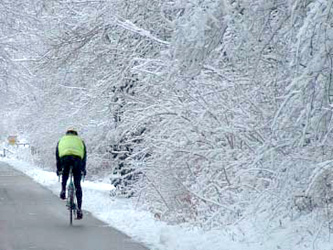
This is the toughest and possibly the most dangerous time of the year to fit those long rides in. But this is also exactly the time of year when you most need to fit in those long rides. You need to build aerobic endurance right now, so you have that strong base to build on later. That means keeping the intensity low and steady while building up the miles gradually until you are over-achieving your target race distances (maybe not for running, though, because of the higher impact and greater risk of injury) in your aerobic endurance heart rate/intensity zone.

If you are a triathlete, then cycling is probably the most time-consuming discipline to train for of the three, since it tends to be the most time-consuming discipline in any race – unless, for example, you are a really, really fast cyclist and a really, really slow runner.   For your longer endurance sessions that probably form your key sessions each week, time spent on the bike can be as much as 2-3 times the time spent running and 5-6 times the time spent swimming. For example, if you are training for Iron-distance races, then you might want to build up to doing:

  • about a 90-minute endurance session each week, gradually getting to the point where you can swim 4000 meters continuously;
  • one long steady distance (LSD) run somewhere around 2-4 hours each week, where you can run about 20 miles steadily and continuously;
  • one long ride of 8-10 hours each week.  Yes, 8-10 hours. Build up to the point where you can cycle about 120 miles on a single ride. At aerobic endurance pace, that means you might not go much faster than 13-15mph.

Not starting right away, not proving how tough and macho you are, when yesterday you were doing 5-mile runs and 25-mile bike rides and tomorrow you’re going to tag along for a 20-mile run or a 100-mile ride. Building up to these steadily and gradually with about 10% increase in volume each week so that, come race season, you have slowly adapted to these longer distances and hopefully avoided injury or burn-out or both.  But, you can see how the cycling part of that picture is the toughest to fit into a schedule that may already include work, sleep, a social life, and a significant other in your life who likes to spend time with you when you’re not snoring or wolfing down food in between training sessions.

So, Winter tends to be a time you need to get creative, add some variety, and find every possible way to get in the training on the bike.  Here are a few tips that have been working for me, so far:
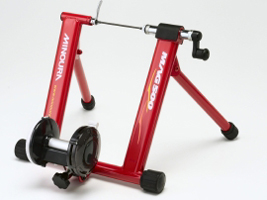
Minoura Mag 500 Turbo Trainer

Get a turbo trainer
There are a few great things about turbo trainers:

  • They don’t have to be outrageously expensive. The Minoura Mag 500, pictured left, is a very good entry-level trainer I bought on sale a few years ago, and I saw one on eBay the other day for less than $100.
  • You attach your bike, via the skewers on the rear wheel, and spin away indoors, in the warmth, safety and comfort of your own home (or in the relative safety and comfort of the back garden, in my case) as long as you want, any time of the day or night.
  • You get to spend more time on your own bike, adjusting and getting used to the set-up on your bike for optimum performance (e.g. so much easier to get the saddle position just right when you are using a turbo trainer). You can try new things out (like the first time you buy clipless pedals and need to practice clicking in and out, or the feeling of being on your new aero bars) on the turbo in relative safety before you take it out on the road.
  • You can do interval sessions with pretty precise control in a way that you can’t always get on the open road. For example, if you are on the road in the middle of a 3-minute higher-intensity interval and you reach a busy intersection with a stop sign, then you have to stop, whether you’ve finished the interval or not. You won’t have that problem on a turbo trainer.
  • You can do many technical exercises and drills on a turbo that you might not be able to do on your bike on the road, like single-leg exercises or hands-free exercises.
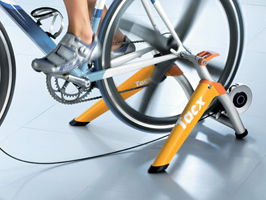
  • Some people love to sit and spin on their turbo trainer for hours and hours, watching TV or listening to music. You can even buy some DVDs that connect to your turbo trainer in a cool sort of virtual reality kind of way (if you buy a pretty high-end one, like the Tacx Satori pictured above, right).

The down-sides of having a turbo trainer, that I’ve seen so far:

  • I find them excruciatingly dull, in much the same way that I find running on a treadmill excruciatingly dull.  I enjoy cycling and running because I enjoy getting out and about and seeing things, exploring places, even familiar places, at different times of the year. I can’t, for the life of me, find a way to spend more than 60 minutes on a turbo trainer without feeling like a hamster on one of those exercise wheels, going absolutely nowhere in pointless repetition.
  • You won’t learn much in the way of bike handling skills on a turbo trainer. You may be getting very fit on the turbo and it may be a great way to tackle specific fitness development, but you won’t be learning anything about braking, cornering, ascending or descending on the bike. Triathletes already have enough handicaps in their bike-handling skills, especially if you are only doing non-drafting races or if you spend a lot of time on the aero-bars. We need to get out on the road and ride for real as much as we can to get those very important bike-handling skills.
  • You will sweat like a pig in a steam room on the turbo.  When you are cycling out on the road, the air rushing past you tends to dry you off as you sweat, most of the time. When you are cycling on the turbo, there is no air rushing past you since you are sitting still, and you are going to create an enormous pool of sweat beneath you very quickly. Even in the middle of January sitting out in your unheated back garden.  So, put something under your body to catch all that sweat.
Go off-road
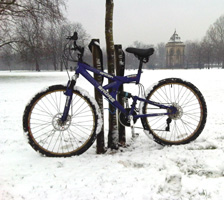
When snow and ice become an issue on the roads in the Winter, then think about going off-road. I bought that bike pictured above second-hand for less than $100, cleaned it up, changed all the cables and pads, plus a new chain and cassette, for a total of another $100 or so, and now I can ride all over the place, whatever the weather. London is not used to seeing much snow in the Winter-time and so it tends to freak people out here, but not me. For me, it means that the streets are less congested and I still get to cycle all over the place.

Here are the things that I like about riding my mountain bike at this time of year:

  • It’s much heavier, clunkier and much less efficient than my road bike or my TT bike. Yes, I think that’s a good thing, because it makes my legs stronger.  With the front and rear suspension on that monster, I estimate (with no scientific basis whatsoever) that every mile I ride on that bike is like riding 2 miles on my sleek, efficient TT bike.
  • I can go places on that bike that I can’t go on my road bike. I can get out there and just have fun, go exploring and play in the mud.
  • Off-road riding tends to give you much better bike handling skills in many areas than road riding does. Having to negotiate puddles, icy patches, trees, tree roots, ditches, leaves and all manner of fun obstacles is a great way to learn how to handle your bike. Come Spring-time, I will be much less scared of puddles, wet leaves, and unevenly paved corners on the road.
  • I live near a part of London that is good for off-road riding (Hackney and Walthamstow Marshes along the Grand Union Canal is fairly flat but lots of little places to go off the beaten path and splash around), and not too far from some even better spots for off-road riding (all around Epping Forest). So, it’s easy for me, maybe not so easy for other city dwellers.

See and be seen

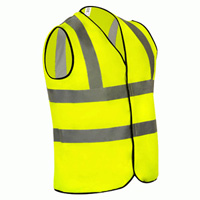
Be safe, be seen. Wear things that are bright and reflective, invest in some good lights, maybe a few lights that will help you see on a totally pitch black morning, but definitely some lights that will make people look at you and notice you. And make sure you have spare, fresh batteries for them.
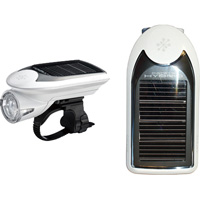
Above is the Cateye Hybrid, which has a solar panel that claims to give you 6 hours of ride time (so that probably means 2 hours to you and me, in real practical terms) and batteries for up to 30 hours (claims like these usually fall short). I haven’t tried this one out, but I’d love to. I love the idea of anything that is solar-powered.
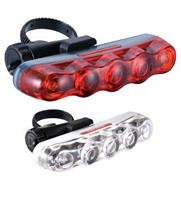
Above, you have the basic Cateye pair of lights for urban-noticeability. I like these because they have lots of blinking settings, they are a little bit bigger than other typical bike lights, and they can be set up either vertically or horizontally, which is kind of cool.
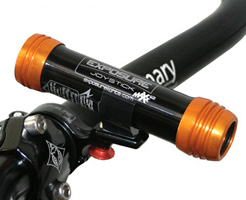
Another choice is the Exposure Joystick Maxx light, that comes with a helmet mount and handle-bar mount. I like the helmet mount because then I can use that light on any bike I ride (I have 3 right now) and don’t have to re-mount it on different handlebars if I use a different bike.
Stay warm and dry

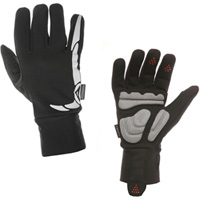
  • Gloves should be keeping your hands warm and dry, and have some padding specifically for cycling if you plan on being on the bike for a long ride.
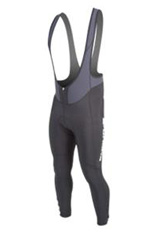
  • Tights should keep you warm and probably be bib tights like those shown above, so they don’t creep down while you are riding.
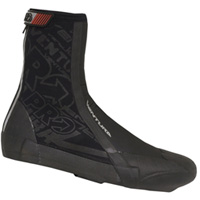
  • Overshoes should keep your feet warm and dry, too.

It’s also a good idea to have a helmet cap to keep your head warm.

On very cold days, I will go as far as the wear under-gloves or a second pair of gloves under my winter gloves, as well as a face mask (or just tie a bandana around my face) to protect the one part of my body that is still exposed.

I once forgot to bring my overshoes on a long ride, so I stopped in at a shop and asked for two plastic shopping bags. Then, I took my feet out of my cycling shoes, put the bags around my feet and then put the shoes back on. Presto! A cheap way to keep the feet warm. They got very sweaty, looked ridiculous, were not very comfortable, but my feet sure stayed warm.

Sometimes the hard work is its own reward

Join a club, find a friend with similar goals to yours, or just somehow find a way to make a promise to someone else that you will do the ride, and then you may find it’s so much more difficult to change your mind and back out at the last minute. Try something new. Get out there and ride when you can.

Make a list of things you like about riding in the Winter and put the list next to your bed. When the alarm goes off and it is still dark and cold and you feel like rolling over and going back to sleep, read the list first. My list of what I like about riding in the Winter looks like this:

  • I get to see the sun rise.
  • I get to ride the streets when they are pretty quiet.
  • I get to see things I normally wouldn’t get to see, like foxes, milkmen driving electric milk floats, and people wearing glittery party clothes as they stumble around the streets.
  • I get to drink as much hot chocolate as I like and never once worry about calories or fat or sugar.
  • I get to ride with some pretty cool people, chat with them for hours, and get to know them a little better. Sometimes I don’t feel like I am boring them to death with all my long-winded stories.
  • The journey is the destination. I love being out there on my bike, any time of the year, and it is always better to be out there than to not be out there wishing I had done it.

Posted by: Robert

Reading Time: 2 minutes

If you enjoy the outdoors all year long, even when it’s wet and cold, you have to prepare properly. When dressing for the winter leave the cotton at home – once wet it’s like a death blanket. Keep your head and neck covered and make sure you have adequate protection for your hands and feet (while allowing for proper blood flow). Make sure you bring a lot of carbs to stay fueled and don’t forget your body needs to stay hydrated – especially in winter.

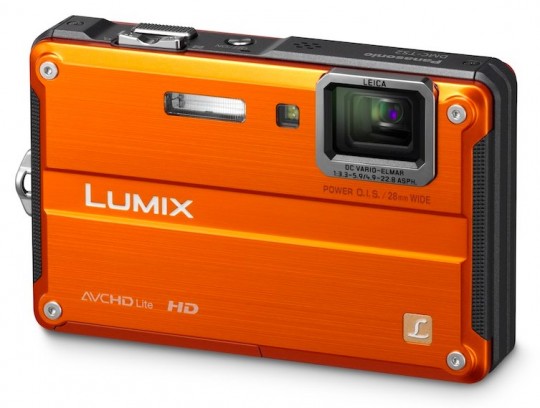
OK Nanook, so you’re ready for a good time in the outdoors with friends and you need a reliable camera to capture those moments where you’re huddled over a fire looking like a ragged group of post apocalyptic survivors. Enter the Panasonic LUMIX DMC-TS2, a waterproof, freeze-proof and shockproof 14.1-megapixel camera also capable of recording HD video.

The LUMIX TS2 is a camera built for action. It’s waterproof to 33 feet /10m (1 atmosphere for you divers), shockproof to 10 feet (2m), freeze-proof to 14° F (-10° C) and dust-proof. The airtight body protects it against water immersion, dust and sand and rubber padding, reinforced glass (protecting the 2.7-inch, 230,000-dot Intelligent LCD) and carbon construction inside the camera further ruggedize the LUMIX TS2 that is also as smart as it is tough.

The LUMIX TS2 is not only tough, it’s also full of features that make it an excellent choice for any occasion. Some features of the LUMIX TS2 include…

  • 28mm wide-angle LEICA DC VARIO ELMAR lens (4.6x optical zoom)
  • Built-in LED light for lighting-up dark areas (such as underwater)
  • Face detection (up to 15 faces)
  • iA (Intelligent Auto) features such as Intelligent auto Resolution,Zoom, AF Tracking, ISO Control and Exposure
  • Built-in Modes such as ‘Happy’ Mode (optimized color, saturation and brightness) for vivid photos or video and High Dynamic Mode for situations where a scene includes bright and dark areas
  • Compatible with SDXC Memory Cards up to 64GB
  • Rechargeable battery that takes up to 360 images on a single charge

Pricing and availability for the Panasonic LUMIX TS2 will be announced 30 days prior to shipping date (unannounced, but note that it’s predecessor, the LUMIX TS1 was priced around $380USD). The Panasonic LUMIX TS2 will be available in silver, blue, orange and yellow.

Posted by: Lawrence

Reading Time: < 1 minute

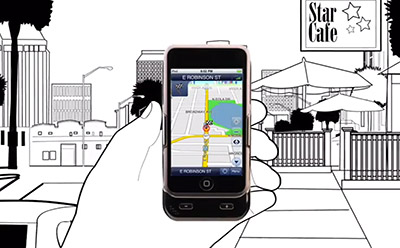
For all you lucky recipients of an iPod Touch this holiday season, there’s a cool and useful accessory coming out later this year to keep an eye on. The XGPS300 iPod Touch GPS Cradle from Dual Electronics turns your iPod Touch into a fully-enabled GPS device. The XGPS300 includes a free turn-by-turn Navigation app NavAtlas, 0-90degree windshield mount and charging cable.

The XGPS300 is more than a GPS navigator, it is also a battery cradle and has an amplified speaker for real-time voice guided navigation. Check-out the video below for a quick demonstration of features and if you’re interested, request to be kept updated as to it’s availability. Expected price is $179USD.

Posted by: Lawrence

Reading Time: 3 minutes

Every car I’ve owned has had a roof rack. Even my old pick-up truck had a bed rack to hold and lock my mountain bike (which cost more than the truck). For my latest rack I switched to a Yakima rack system and I’m happy I did.

landingpad

Assuming I’d need a few hours for installation on my SUV, I skimmed the directions and dove right in. To start, I had some kind of brainchild and pre-assembled the Landing Pads by loosely fitting the nuts before sliding them into position in the the factory rails. This saved me any potential difficulty trying to line-up the bolts.

Next, I snapped the Control Towers into the Landing Pads, installed the Crossbars and tightened it all down – simple! Finally, I inserted the SKS Lock Cores and had the whole thing installed in under 30 minutes! My wife thought I gave up when I went back inside, so suffice it to say it was far easier to install than I expected (I worked at a ski shop for years and installed numerous square bar systems).

Two friends of mine have square bar racks from a competing manufacturer and recently asked me to help install them. The first rack we couldn’t figure out at all (to be fair we didn’t have directions, but I feel with the Yakima I could have figured it out). Eventually we caved and had a local bike shop do the install for $50. The other rack took ages to install (in a frigid driveway), but it was essential we got it done since we were all staying at his ski house in Vermont!

Large Push Button

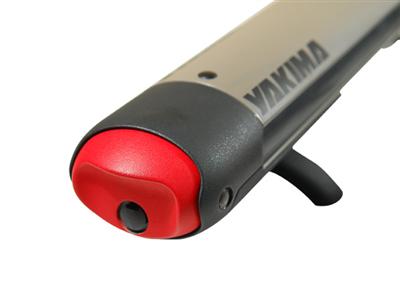
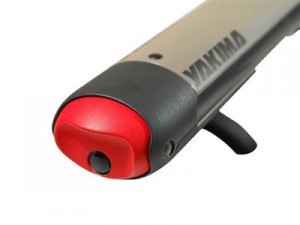
As far as attachments, I’ve been using the Yakima StrapThang for surfing and love it. This past holiday weekend we headed up North and I easily installed the FatCat 4 which comes with universal mounting hardware to fit most applications. I also liked the large button to open the rack – easy even in clunky mittens.

Unfortunately, I have to remove the StrapThang to accommodate the FatCat 4 (a combination of the shorter 48″ crossbar and to have room for a wider surfboard), but attachments install and remove easily so no biggie there. Yakima sells crossbars in 48″, 58″, 66″ and 78″ lengths and the general rule-of-thumb is a crossbar can go as wide as the side-view mirrors.

I had to forgo the cargo box I own for another rack system. I think newer cargo boxes can go on either system, but mine is old and cracking so it’s just as well. It was more than a little cramped in the SUV with the wife, kids and all the gear, but the skis and snowboard were up top, so only soft projectiles were possible!

If you’re looking for a rack system you’ll find two camps – round and square. Both are priced competitively, have long track records and offer a variety of options (fittings and attachments). I read somewhere round structures are stronger than square, but I’d recommend the Yakima system for ease-of-installation alone.

Posted by: Lawrence