Tag Archive for: gadget

Reading Time: < 1 minute

Over the years bitness.com has run a series of articles on gadget recycling and greener gadgets.

Since many of you likely received new and improved heart rate monitors, phones and other gadgets this holiday season, you might be faced with the dilemma of what to do with older electronics you no longer need?

The US Environmental Protection Agency (EPA)* provides information on where to donate or recycle old computer and other electronic products in your area. So if you can’t sell it on eBay or pass it down to a friend/family member, do the right thing and find a local donation or recycling center in your area through the EPA.

Happy Holidays!

* UK readers can look into programs such as MirrorGoGreen, or Google ‘gadget recycling.’ Readers in other countries are encouraged to do the same!

Reading Time: 3 minutes

I was an early iPhone adopter – before the App store and just stoked on the idea that I had a cool phone and a way to browse the web at decent speeds on a decent-sized screen. The initial gee-whiz of what could be done on the iPhone was soon overshadowed by what it couldn’t do and the lack of certain features continue to stick-out.

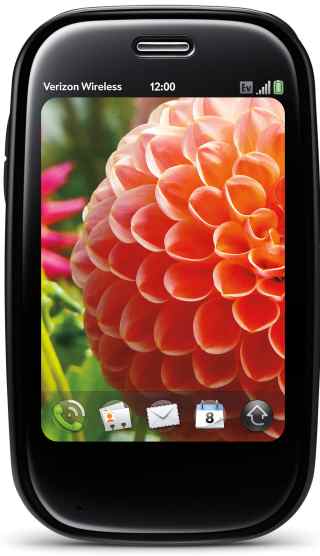
As fast as it looks, the Palm Pre Plus

By far the most glaring omission with the iPhone is the inability to tether it to a computer. While this isn’t a limitation of the iPhone itself (it’s more like a disabled feature) it leaves many, including myself, looking for alternative solutions. The Palm® Pre™ Plus not only let’s you tether (via Bluetooth), but Palm incorporated a mobile hotspot into the Pre which allows as many as 5 concurrent users to jump online.

The Pre is a sleek looking slider phone (keypad slides-out from the bottom) with a built-in camera and flash. It feels nice in your hand and slips easily into your front pocket. It’s so sleek in fact, that it took me a while to find the USB port to charge the phone! I also puzzled over how to close apps (you flick them upwards) and the small keypad gave me fits. When I first receive a gadget I purposely avoid the manual to see how intuitive it is and I have to say the Palm Pre Plus is miles from Apple in regards to ease-of-use.

Voice: In my tests the Palm® Pre™ Plus on the Verizon network performed well, with good sound clarity and clear voice transmission. To dial numbers you use the touchscreen and not the tiny keypad. The Pre worked everywhere I tried it, including spots my iPhone loses coverage. AT&T recently announced plans to spend $18 – $19 billion on network upgrades, but there is far less AT&T coverage in my area than Verizon.

Data: The Palm Pre takes advantage of Verizon EV-DO Rev. A and offers speeds equal or greater than speeds enjoyed on an iPhone 3GS. EV-DO Rev. A data can peak at 3000 kbps, but on average users get around 600Kbps-1400Kbps.

In Rhode Island I enjoyed, on average, 1.50Mb/s download and 0.52Mb/s upload. And in New York City the rates were 1.00Mb/s download and 0.21Mb/s upload. This means in RI I can expect to download a 5MB MP3 file in about 25 seconds, or a 35MB video in 3 minutes – not bad!

If you’re looking for a phone that is very slick looking, offers reliable voice and fast data (for you and up to 5 friends) and you have the patience to read the manual or play with it enough to learn how to use it, then the Palm Pre is a wise choice. Full retail price is listed at $599.99, but with 2yr contract the Palm Pre Plus can be yours for $49.99 (early termination fees do apply). This phone also requires a data package ($29.99 or higher per month). Visit Verizon Wireless for more information.

Specs:
Battery Usage: Up to 330 minutes talk time / Up to 350 hours standby
Dimensions: 3.9″ (H) x 2.3″ x (W) x 0.67″ (D)
Weight: 4.89 oz.
Display: 3.1″(HVGA 480 x 320), 24 bit TFT
Memory: 16GB Flash/512 RAM
Bluetooth® Wireless Technology–(V 2.1+EDR)
3 Megapixel camera with flash
Palm webOS™ platform
Wi–Fi Ready (802.11 b/g)
Music Player for MP3, AAC, AAC+, WAV, AMR, QCELP
Email: Exchange ActiveSync support

Posted by: Lawrence

Reading Time: 2 minutes

Interval training is increased intensity for a given activity (lifting, running, rowing, cycling) for a measured amount of time, followed by a reduced level activity for a measured amount of time. Typically done in sets, interval training can be anaerobic – fat burning high intensity interval training (HIIT) typically focused on starving larger muscle groups of oxygen – or aerobic, where low to moderate intensity is used for a longer period of time, allowing muscles to ‘breathe’ and build stamina.

Both anaerobic and aerobic exercise are beneficial and interval training is a great tool to realize those benefits, while at the same time adding a new dimension to workouts to keep them interesting.

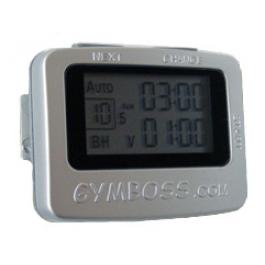
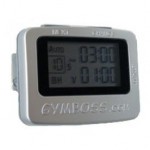
Measuring intervals is easy, but too often it distracts you from your chosen exercise. I’ve been in all-out sprints with my left arm unnaturally poised in front of me so I could read my watch (with difficulty and added risk). Others rely on a partner’s shouts to let them know when to speed up, slow down or stop. A small device called the GymBoss (1 3/4 x 2 1/4 inches) is a lightweight, inexpensive ($20USD) and eliminates the need to focus on anything else but your workout. Clip it to your belt, stick it in your pocket or place it on a shelf for indoors workouts – it’s barely noticeable until a shrill beep, strong vibration or both effectively alert you (to be honest the first time it beeped it startled the hell out of me).

The GymBoss easily satisfies what I would consider my basic need for measuring intervals while running. Others use it to time rounds (up to 99 can be programmed) on the heavy bag or for cycling, weight lifting and other pursuits. Other GymBoss features include…

  • One or two different time intervals from 2 seconds to 99 minutes
  • Auto mode / repeat through intervals
  • Manual mode / countdown timer
  • Stopwatch

The manual is a small double-sided slip of paper they package under the belt clip. If you’re just getting started with interval training and want more information, check out some of these sites so the directions make more sense and you can program the GymBoss accordingly…

http://www.intervaltraining.net/
http://en.wikipedia.org/wiki/Interval_training
http://sportsmedicine.about.com/od/tipsandtricks/a/Intervals.htm

For $20USD you really can’t beat the GymBoss, it does everything it says it does and does it well.

Posted by: Lawrence

Reading Time: 2 minutes

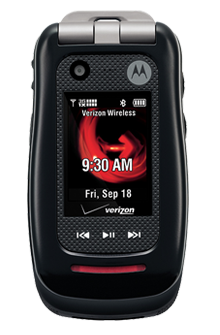
Not everyone needs an iPhone or even a smartphone for that matter. For many, the only functionality needed is good voice quality and the only feature required is reliability. Enter the Motorola Barrage, both uniquely feature-rich as well as durable and providing what I perceived to be above-average voice quality.

Ideally suited for those who work or play outdoors, the Barrage meets or exceeds military specifications for dust, shock and weather. In fact, the Barrage is waterproof in up to one meter of water and submerged for up to 30 minutes. I threw it in the snow, plopped it in a glass of water, took it to the beach and – the test of all tests – let my 6-year-old play with it. Beyond the tested toughness, the Barrage feels like a solid piece of tech, weighing 4.2 ounces and handsomely constructed using black textured rubber and plastic.

Offered by Verizon Wireless for $129.99 (with $50 online discount), the push-to-talk capable Barrage’s 383 minutes of talk-time competes for battery life with a host of features including a 2 megapixel camera (non-camera version also available), music player, bright external 120 x 160 display and TFT internal display (176 x 220).

VCAST and VZ Navigator service are available for additional monthly fees and the streaming in my area was admirable. In my opinion however, the screen size on flip phones in general renders services such as these to be more of a gimmick than useful.

If watching video on the go or you’re frequently going to use the navigation service, you’re better off with smartphone. If you’re the outdoorsy type, or even clumsy, the Motorola Barrage is your ideal phone. With quality construction, a host of features, Verizon’s unparalleled coverage and above-average voice quality, the Motorola Barrage is ready to go to work for you.

Reading Time: < 1 minute

While it’s true the main focus of Bitness is fitness gadgets, we do – from time-to-time – write about gadgets for dogs. Most of these gadgets (like this, this and this) border on animal cruelty, but possible none quite so much as the PooTrap…

Source: Geekologie

Reading Time: 3 minutes

There is no denying our infatuation with gadgets is taking it’s toll on the environment. By following the three R’s (reduce, reuse, recycle) that have become synonymous with ‘green’ living, this article helps inform gadget enthusiasts what we can do to tread lightly.
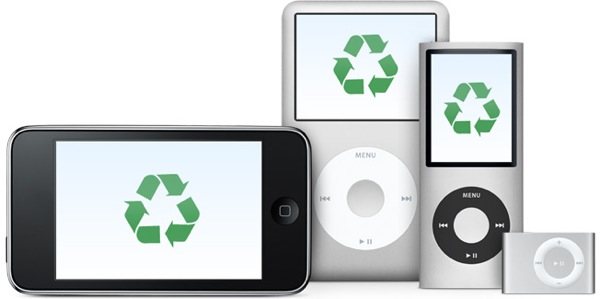
recycle your gadgets

Reduce: energy consumption

While some gadgets can have a positive impact to the environment (for example a GPS device can help reduce fuel consumption), most do not. Energy consumption by gadgets is putting the world on track for 200 new nuclear power plants by 2030! Here are two suggestions on how to take action…

1. Be aware: Google PowerMeter

Tells you how much it costs to make toast, what your TV addiction means to your bank account and which appliance is the biggest energy hog of the bunch (and may need replacing). You can also compare your energy efficiency to similar homes in your neighborhood. Check with your utility company or visit Google for more information.

2. Seek renewable energy sources: Solar, hydro, wind and hand cranks are making leaps and bounds in providing viable energy alternatives to gadget users.

Solar – Harness the suns energy, it’s better for your wallet and the environment
Hydro – Vena Micro-Hydro turbine, take it along on your next campout
Wind – Wind power generators are popping-up in fields, on rooftops and now on handlebars!
Hand cranks – becoming more common on flashlights and radios, but you can also purchase a standalone hand crank to generate power your other mobile gadgets

Reuse: older or broken gadgets

Even with a perfectly good working Blackberry or iPhone, we want the newer model before anyone else – no matter the cost to our bank account or to the environment. That there is nothing wrong with our existing phone doesn’t stop us from replacing it post-haste. A site called ReCellular states that “One in three Americans will replace their cell phones this year, adding to the 500 million unused phones currently waiting to be discarded or recycled.”

Self proclaimed electronic sustainability firm ReCellular allows you to buy, sell and donate old cellular equipment. You can also set-up a donation program through ReCellular in your area as a way to generate revenue while at the same time helping the environment.

myGreenElectronics is another option for reusing or recycling old electronic equipment, including PCs. Through relationships they’ve established with charities, community programs and schools, you can sell or donate equipment no longer needed. Check out the energy calculator on myGreenElectronics and see how much you’re spending to run your gadgets.

When a gadget no longer works many of us toss it and get the new one. But a growing number of people are attempting their own repairs, or creating new devices using the parts contained in broken gadgets. There are groups popping all over the world called Hackerspaces. These community-operated physical places allow people to meet and work on projects together. You’re only limited to your imagination as to what you turn an old cellphone, LCD, washing machine and weed whacker into. Throw those broken gadgets in a box and head down to a Hackerspace near you.

There are magazines and endless links through Google for ways to make use of still functioning components in otherwise broken gadgets. Reuse what you have by selling, donating or converting it into a new gadget entirely.

Recycle: old or broken gadgets

In the United States, about 130,000 computers are thrown out every day. According to the US Environmental Protection Agency (EPA), approximately 18 percent (414,000 tons) of discarded TVs and computer products were collected for recycling in 2007. Many of these devices contain lead, mercury, cadmium and brominated flame retardants which have to be properly discarded. These same devices also contain precious resources such as copper, gold, silver, platinum and palladium which businesses seek to recover for financial gain.

Because some of today’s gadgets are too difficult to open to even attempt repair, many elect to simply discard and replace. There are sites that can help you figure out how to attempt a repair yourself, or you can opt to sell or give away broken gadgets. If you can’t or don’t want to tinker yourself, you may even be able to sell your gadgets on Gazelle or BuyMyTronics or give them away in your local Craigslist’s ‘Free’ area.

Before you toss that old TV, phone or iPod away, visit EPA eCycling to learn about recycling programs in your area. For phones don’t forget to cancel service, delete contacts and (Paris Hilton, this is for you) delete pictures and other personal and sensitive information. Some recycling centers will offer to do this for you for a small fee, but it’s a safer bet if you do it yourself.

Reusing and recycling electronics conserves natural resources, avoids water and air pollution and reduces greenhouse gas emissions created when new products are manufactured. Keep it clean – go green!

Reading Time: < 1 minute

However unintentional, this is shaping up to be ‘Green Week’ on Bitness. Google.org just released a list of partners (typically power companies) from all over the world, who will install ‘smart meters’ that interface with and provide data to Google’s PowerMeter gadget.

The PowerMeter Gadget can tell you how much it costs to make toast, what your TV addiction means to your bank account or if which appliance is the biggest energy hog of the bunch (and may need replacing). You can also compare your energy efficiency to similar homes in your neighborhood. Unfortunately, not every utility company is working with Google.org, but they plan to expand the roll-out of Google PowerMeter later in 2009.

Here’s what one user had to say…

“I put the sound system, DVD player and VCR on power strips. I learned that my computer wasn’t sleeping properly, and started putting it on Standby when not in use. I cleaned the coils in my refrigerator (which hadn’t been cleaned in 15 years! Yikes!). Before I made these changes, my baseline load was around 360 W, afterwards, it was slightly under 200 W – this will save me about $150 / year.”
Alec, Mechanical Engineer

https://youtube.com/watch?v=6Dx38hzRWDQ%26hl

Posted by: Lawrence

Reading Time: < 1 minute

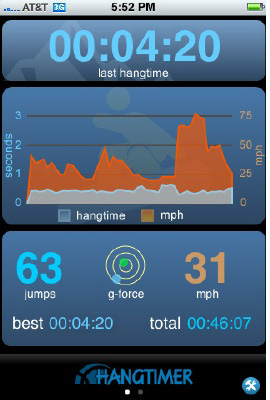
Many moons ago I wrote about the Airpod, a device you wear while snowboarding that measures hang time while pulling airs. Now an application for the iPhone does that and adds a few more bells and whistles to boot.

HangTimer for the iPhone uses the iPhone’s accelerometer and “hairy math” to calculate air time from the point of take-off, speed at take off and location at point of take-off. HangTimer detects your location and provides trail maps, snow reports and resort web cams (when available). For 3G users there is the following added functionality…

  • Detailed speed and location of every jump
  • Link to Google Maps to plot your hits
  • Top Speed at takeoff for every jump

Of course the HangTimer can be used for any sport where it’s safe to have your phone on you (mountain biking for example). I’m interested to know if, when climbing, will the HangTimer measure falling distance (WhipperTimer anyone)?

The full version of HangTimer sells for $9.99. There is a free version which lacks many of the features described above, but does measure hag time and tracks your best jump and total airs per session. Personally I feel this app is well worth it, since I can slip my iPhone in the pockets of unsuspecting ‘big air’ friends only to bring them back down to earth aprés.

Posted by: Lawrence