Tag Archive for: iPhone

Reading Time: < 1 minute

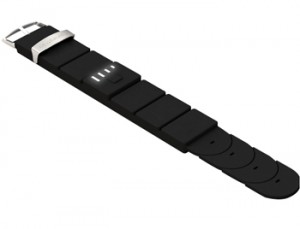
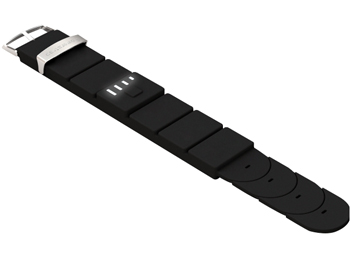
While Wonder Woman’s Amazonium bracelets were useful for deflecting bullets, they won’t charge an iPhone or a Nintendo DS. It’s because of this simple fact that we recommend the Orca PowerStrap in lieu of the bullet blocking power coveted by the Amazon women of Paradise Island.

The Orca PowerStrap is a battery pack disguised as a watchband. It has a USB plug that will let you charge an iPhone, iPod, Nintendo DS/DS Lite/DSi, PSP and mobile phones from Samsung, Sony Ericsson, Nokia, Blackberry, LG and other devices through a USB connection.

To illustrate the amount of power provided, the Powerstrap (which reportedly takes five hours to fully charge) can provide up to 3 hours of talk time, or 8 hours of audio playback. It has four LED indicators that let you know how much battery capacity remains.

While it’s expected to be available in a number of colors (including red, yellow, green and blue) only black is currently available as far as we can tell. You can purchase it through IWOOT for $65USD for your favorite power-hungry gadget geek (or amazon) this holiday season.

Posted by: Lawrence

Reading Time: 2 minutes

I’ve always marveled at how small retired NBA basketball and now actor John Salley’s ears are. Truth is I have small ears too – not as disproportionate as Mr. Salley’s who at 6’11” has ears the size of nickels, but small nonetheless.

Having small ears was never a big deal back when headphones were worn over the ear, but most headphones today (and Bluetooth headesets) are of the earbud variety and for people like me and JS, keeping earbuds in your ears, particularly when sweaty from working out, is damn near impossible.

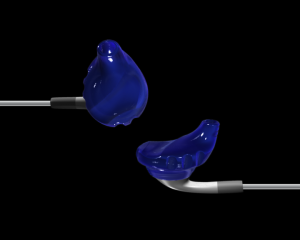
Yurbuds™ have an earbud system that caters to people of all ear types and is specifically designed to keep the earbuds in your ear even through intense physical activity. Yurbuds are two soft rubber ‘boots’ that fit over the provided ‘Apple-style’ earbuds, but can be used with other earbuds or headsets as well. The Yurbud has a small funnel of sorts that fits into your ear canal and the outer-ridge of the Yurbud is grooved, helping them stay in place – even when sweating heavily.

When you order your Yurbuds you submit a picture of quarter placed just below your earlobe. This helps them determine the size of your ear and fit you correctly to Yurbud for your ears. In all my tests of the Yurbuds – running in near 80F+ degree heat for an hour, the Yurbuds never moved and never bothered me. I also got caught in a thundershower on a run (never fun) and again, the Yurbuds hung in there and Mishka kept signing me up the hills and back to my home.

Because Yurbuds are comfortable over long periods of time and stay in place even while sweating, they’re perfect for runners, bikers, and amateur athletes who are looking for a headphone solution you barely even notice.

Priced a very reasonable $29.99, Yurbuds are the perfect solution for anyone looking for headphones that stay in your ears regardless of how much you sweat or for anyone just looking for a more comfortable earbud from prolonged use.

Posted by: Lawrence

Reading Time: 3 minutes

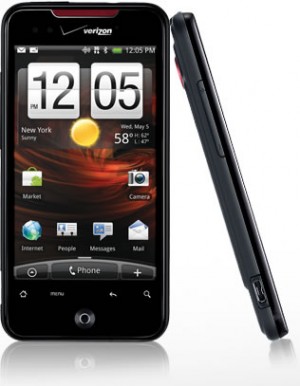
Android continues to mature in the smartphone market and the HTC Incredible on the Verizon network gives the Apple iPhone a whole host of reasons to take notice. First and foremost the HTC Incredible gets a signal, an increasingly difficult task at least for myself and fellow iPhone/AT&T users in our neck of the woods (from time-to-time my “neck of the woods” includes New York City).

A fast and fully-featured Smartphone, the HTC Incredible works extremely well for both voice and data. It’s a light, sleek phone you barely notice in your pocket, yet is packed with power and features that surpassed any preconceived notions I had going into the tests.

The iPhone continues to be the benchmark for Smartphones and happens to be the smartphone I pay dearly for month-after-month. While Apple prepares to roll-out the iPhone 4 on 24-June, 2010 with a number of new features, I may very well be a Verizon customer before then. The HTC Incredible on the Verizon network out-performed my iPhone in coverage, voice clarity and network speed (browsing) and already includes multi-tasking and folders (2 examples of what to expect in the new iPhone iOS 4). If the Incredible provided a wi-fi hotspot or tethering (something out-of-the-box and not rooting or installing anything), I would have already made the leap.

Interface
The HTC Incredible’s interface takes some getting used to. It wasn’t obvious to me how to quit an application and stop it running in the background. Not only does this tax the processor, but when I finished testing Skype (great sound quality over the 3G network in my tests by the way), I inadvertently left the app running and kept myself logged-in for the rest of the day.

HTC’s updated ‘Sense’ user interface, while polished (thanks in large part to a powerful 1GHz processor that can support it), is still not as natural as Apple’s interface in my opinion. I do like the ability to view the separate screens as cards and can quickly jump between with smooth transitions. But in terms of overall ease-of-use, or intuitiveness, the iPhone still has it.

Applications
The Android Marketplace is loaded with free and paid alternatives similar to what you can find in Apple’s App store. Apple boasts roughly four times the number of apps as android (reportedly somewhere around 50,000 apps). While many people don’t like that Apple controls what can and can’t appear in the App Store, it does add a layer quality control. Third party apps are probably the leading cause for Android crashes on what is otherwise a stable OS.

Smartphone Performance
Following are notes about the Incredible’s performance in key areas to consider for any smartphone…
Voice: High quality and with far less dropped calls and a greater service area than Im used to (on existing 3GS iPhone/AT&T)
Data: Fast web browsing. Gmail and Exchange support
Camera: 8-megapixel autofocus camera with video and LED flash
Music: Sounds OK through speaker and very good with headphones (headphones are also required to use the FM radio app)
Display: 3.7-inch AMOLED (800 x 480 pixels) is bright and very vivid
Interface: Sense; Improved over earlier Android units tested, but still not as intuitive as the iPhone
Storage: 8GB expandable to 16GB with microSD card (sold separately)
Speed: Fast processor (1-GHz SnapDragon processor)
Battery: Battery will get most users through the day, but for very active users (music, Facebook, talk, numerous Apps, etc) you will want to either bring along the cable, or balance-out your day better

Price: $199 purchased online with 2-year Verizon contract

Posted by: Lawrence

Reading Time: 3 minutes

I was an early iPhone adopter – before the App store and just stoked on the idea that I had a cool phone and a way to browse the web at decent speeds on a decent-sized screen. The initial gee-whiz of what could be done on the iPhone was soon overshadowed by what it couldn’t do and the lack of certain features continue to stick-out.

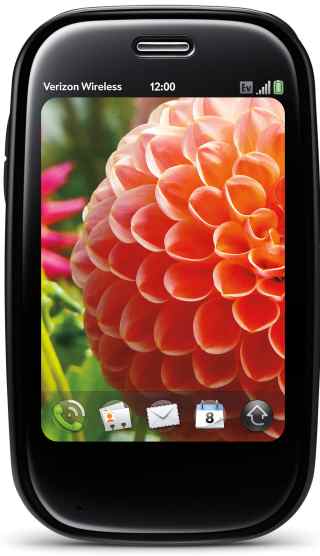
As fast as it looks, the Palm Pre Plus

By far the most glaring omission with the iPhone is the inability to tether it to a computer. While this isn’t a limitation of the iPhone itself (it’s more like a disabled feature) it leaves many, including myself, looking for alternative solutions. The Palm® Pre™ Plus not only let’s you tether (via Bluetooth), but Palm incorporated a mobile hotspot into the Pre which allows as many as 5 concurrent users to jump online.

The Pre is a sleek looking slider phone (keypad slides-out from the bottom) with a built-in camera and flash. It feels nice in your hand and slips easily into your front pocket. It’s so sleek in fact, that it took me a while to find the USB port to charge the phone! I also puzzled over how to close apps (you flick them upwards) and the small keypad gave me fits. When I first receive a gadget I purposely avoid the manual to see how intuitive it is and I have to say the Palm Pre Plus is miles from Apple in regards to ease-of-use.

Voice: In my tests the Palm® Pre™ Plus on the Verizon network performed well, with good sound clarity and clear voice transmission. To dial numbers you use the touchscreen and not the tiny keypad. The Pre worked everywhere I tried it, including spots my iPhone loses coverage. AT&T recently announced plans to spend $18 – $19 billion on network upgrades, but there is far less AT&T coverage in my area than Verizon.

Data: The Palm Pre takes advantage of Verizon EV-DO Rev. A and offers speeds equal or greater than speeds enjoyed on an iPhone 3GS. EV-DO Rev. A data can peak at 3000 kbps, but on average users get around 600Kbps-1400Kbps.

In Rhode Island I enjoyed, on average, 1.50Mb/s download and 0.52Mb/s upload. And in New York City the rates were 1.00Mb/s download and 0.21Mb/s upload. This means in RI I can expect to download a 5MB MP3 file in about 25 seconds, or a 35MB video in 3 minutes – not bad!

If you’re looking for a phone that is very slick looking, offers reliable voice and fast data (for you and up to 5 friends) and you have the patience to read the manual or play with it enough to learn how to use it, then the Palm Pre is a wise choice. Full retail price is listed at $599.99, but with 2yr contract the Palm Pre Plus can be yours for $49.99 (early termination fees do apply). This phone also requires a data package ($29.99 or higher per month). Visit Verizon Wireless for more information.

Specs:
Battery Usage: Up to 330 minutes talk time / Up to 350 hours standby
Dimensions: 3.9″ (H) x 2.3″ x (W) x 0.67″ (D)
Weight: 4.89 oz.
Display: 3.1″(HVGA 480 x 320), 24 bit TFT
Memory: 16GB Flash/512 RAM
Bluetooth® Wireless Technology–(V 2.1+EDR)
3 Megapixel camera with flash
Palm webOS™ platform
Wi–Fi Ready (802.11 b/g)
Music Player for MP3, AAC, AAC+, WAV, AMR, QCELP
Email: Exchange ActiveSync support

Posted by: Lawrence

Reading Time: < 1 minute

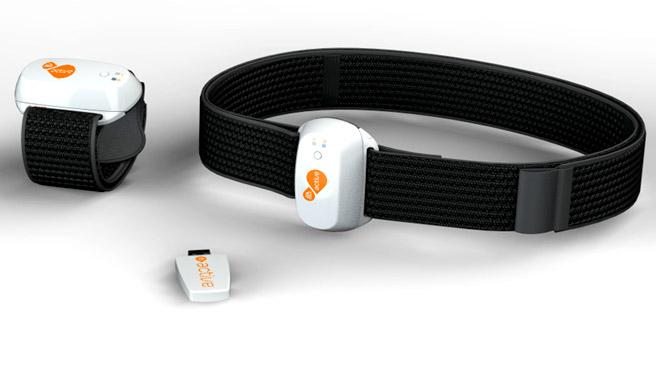
EA has announced EA SPORTS Active 2.0 (working title). Scheduled for release this fall, EA SPORTS Active 2.0 is expected to offer a wireless heart rate monitor, arm and leg accelerometers for use with PlayStation 3, Wii, iPhone and iPod touch.

Users can track exertion in real-time with an onscreen display and also share workouts with other EA SPORTS Active users online. Sharing fitness results, interacting with workout groups and sending messages to other users is expected to keep users inspired and engaged.

PlayStation 3 users will also benefit from the ability to download new workouts and exercises to their internet-connected consoles. Other online features include EA’s’ total body conditioning’ workouts, progressive exercises in a three-phase, nine-week program intended to help provide a fitness road-map while motivating users to stay on track with their fitness goals. An EA SPORTS Active personal trainer can help walk users through a workout and provide continued encouragement with feedback to ensure an optimal workout experience.

Posted by: Lawrence

Reading Time: 2 minutes

In the Northeast the weather can change in an instant. This time of year temperatures fluctuate +/- 20° F almost daily. Being resistant to bad weather is important in these parts (I see kids in t-shirts at the bus stop in January), being prepared for bad weather is vital.

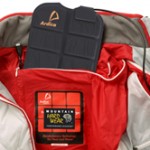
Mountain Hardwear, a manufacturer of innovative and high quality outerwear and gear, has begun incorporating a heating and charging system into their Radiance and Refugium jackets. Developed over the past several years, the heaters are constructed using stainless steel fibers spun into yarn and sewn into the garments in three strategic locations (one in the back and two in the front) and are reported to work in temperatures 20-30° below freezing and continue to work for up to 8 continuous hours.

In addition to providing heat, the Radiance and Refugium jackets are also equipped to power an array of personal electronic devices, when utilizing the Tech Connector (sold separately for $50). Charge your MP3 player, GPS, lights cellular and satellite phones, etc – all in the front left pocket while simultaneously enjoying the warmth the jacket’s heaters provide.

To power their heated and charge-capable garments, Mountain Hardwear selected the Moshi Power System by Ardica Technologies. Surprisingly unobtrusive, the Ardica system uses a flat, flexible lithium ion battery array that slides into a compartment in the upper back of the jackets. Purchased separately for $145, the Moshi Power System provides power and charging capabilities via a USB cable threaded neatly and discretely from the power source located in the back to the front left pocket. The Moshi battery can be recharged from any standard wall jack and reportedly charges 80% in 1.5 Hours and 100% in 3 hours.

Weighing just 295 grams (~10.5 ounces – about the same as 2 iPhones), the Moshi battery can be pulled from the jacket and used as an on-the-go source for a charge. Fully charged, the Moshi battery can reportedly provide up to 20 charges before needing to be recharged!

All-in-all, the cost of the Radiance or Refugium jackets, with charging capability, is about $425, placing it in the price range of comparative high-end jackets. Wear alone, or under a shell for extraordinary warmth and charge portable electronics on the go!

Posted by: Lawrence

Reading Time: 2 minutes

I’ve taken your standard hand-held Sony camcorder on many hell-runs down steeps or through glades and only broke one camera. This point of view (POV) filming let’s me relive snowboarding in the off season, reminding me of favorite lines… and the one camera I ruined. Was it a rock or a root I hit? I can’t remember, but I do recall that having both hands free when snowboarding is kind of important.

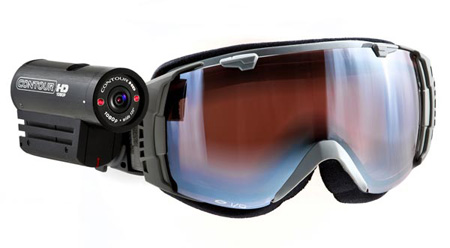
There are helmet and even surfboard-mounted cameras like the GoPro cameras; great, low-cost cameras that capture your personal Jeremy Jones moments in either video or pictures taken at set intervals. If you’re looking to step-up the recording quality and not give up much in the way of size and weight, the VholdR CountourHD1080p is worth looking at.

The ContourHD is easy to use, even with gloves on. Simply slide the record switch forward to record and slide it back to stop. Don’t like to hear your grunts or record your expletives (I’m still talking about snowboard filming here), the CoutourHD can record in silent mode. It uses two lasers to help you line-up your shots when mounting it on a helmet, goggles or handlebars and the battery lasts up to 3 hours.

The CountourHD is spartan when it comes to controls, but I feel this is a positive. The less small or moving parts on a device taken out in the wild, the better. If comes with Easy Edit software that allows you to adjust contrast, exposure, metering and audio gain. I would like to see Easy Edit ported to iPhone or Android, allowing you to make adjustments to changing conditions and light when you’re out-of-bounds and your office is the glade before you.

At just 4.3 ounces the ContourHD can be pre-ordered at vHoldR for $330, making it is as light in the wallet as it is in the hand. Get one and get outside to record your next adventure. VholdR has a good community of users posting their adventures on VholdR.com.

Posted by: Lawrence

Reading Time: 3 minutes

There is no denying our infatuation with gadgets is taking it’s toll on the environment. By following the three R’s (reduce, reuse, recycle) that have become synonymous with ‘green’ living, this article helps inform gadget enthusiasts what we can do to tread lightly.
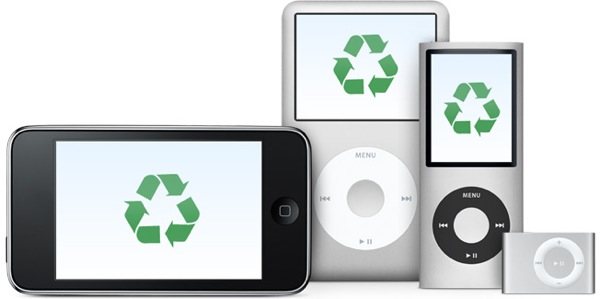
recycle your gadgets

Reduce: energy consumption

While some gadgets can have a positive impact to the environment (for example a GPS device can help reduce fuel consumption), most do not. Energy consumption by gadgets is putting the world on track for 200 new nuclear power plants by 2030! Here are two suggestions on how to take action…

1. Be aware: Google PowerMeter

Tells you how much it costs to make toast, what your TV addiction means to your bank account and which appliance is the biggest energy hog of the bunch (and may need replacing). You can also compare your energy efficiency to similar homes in your neighborhood. Check with your utility company or visit Google for more information.

2. Seek renewable energy sources: Solar, hydro, wind and hand cranks are making leaps and bounds in providing viable energy alternatives to gadget users.

Solar – Harness the suns energy, it’s better for your wallet and the environment
Hydro – Vena Micro-Hydro turbine, take it along on your next campout
Wind – Wind power generators are popping-up in fields, on rooftops and now on handlebars!
Hand cranks – becoming more common on flashlights and radios, but you can also purchase a standalone hand crank to generate power your other mobile gadgets

Reuse: older or broken gadgets

Even with a perfectly good working Blackberry or iPhone, we want the newer model before anyone else – no matter the cost to our bank account or to the environment. That there is nothing wrong with our existing phone doesn’t stop us from replacing it post-haste. A site called ReCellular states that “One in three Americans will replace their cell phones this year, adding to the 500 million unused phones currently waiting to be discarded or recycled.”

Self proclaimed electronic sustainability firm ReCellular allows you to buy, sell and donate old cellular equipment. You can also set-up a donation program through ReCellular in your area as a way to generate revenue while at the same time helping the environment.

myGreenElectronics is another option for reusing or recycling old electronic equipment, including PCs. Through relationships they’ve established with charities, community programs and schools, you can sell or donate equipment no longer needed. Check out the energy calculator on myGreenElectronics and see how much you’re spending to run your gadgets.

When a gadget no longer works many of us toss it and get the new one. But a growing number of people are attempting their own repairs, or creating new devices using the parts contained in broken gadgets. There are groups popping all over the world called Hackerspaces. These community-operated physical places allow people to meet and work on projects together. You’re only limited to your imagination as to what you turn an old cellphone, LCD, washing machine and weed whacker into. Throw those broken gadgets in a box and head down to a Hackerspace near you.

There are magazines and endless links through Google for ways to make use of still functioning components in otherwise broken gadgets. Reuse what you have by selling, donating or converting it into a new gadget entirely.

Recycle: old or broken gadgets

In the United States, about 130,000 computers are thrown out every day. According to the US Environmental Protection Agency (EPA), approximately 18 percent (414,000 tons) of discarded TVs and computer products were collected for recycling in 2007. Many of these devices contain lead, mercury, cadmium and brominated flame retardants which have to be properly discarded. These same devices also contain precious resources such as copper, gold, silver, platinum and palladium which businesses seek to recover for financial gain.

Because some of today’s gadgets are too difficult to open to even attempt repair, many elect to simply discard and replace. There are sites that can help you figure out how to attempt a repair yourself, or you can opt to sell or give away broken gadgets. If you can’t or don’t want to tinker yourself, you may even be able to sell your gadgets on Gazelle or BuyMyTronics or give them away in your local Craigslist’s ‘Free’ area.

Before you toss that old TV, phone or iPod away, visit EPA eCycling to learn about recycling programs in your area. For phones don’t forget to cancel service, delete contacts and (Paris Hilton, this is for you) delete pictures and other personal and sensitive information. Some recycling centers will offer to do this for you for a small fee, but it’s a safer bet if you do it yourself.

Reusing and recycling electronics conserves natural resources, avoids water and air pollution and reduces greenhouse gas emissions created when new products are manufactured. Keep it clean – go green!

Reading Time: < 1 minute

In the past week I’ve had 4 people tell me how grateful they were that I turned them on to Steepandcheap.com. Steep and Cheap sells gear (I’d describe it as general outdoorsy gear) one item at a time until it’s either sold out or times-out, at which point it’s on to the next item.

Steep and Cheap mostly sells-out because the deals are good – usually in the 60% off or more range. Act fast if you see something you like! With back-to-back deals all day long it can get addicting and there’s a number of ways to stay tuned-in to deals that are poppin’ (RSS, sidebar gadgets, plug-ins, email, IM and soon an iPhone app).

I’ve been a Steep and Cheap customer since they started and have seen the concept grow wildly. Sister sites now include…

  • Chain Love for biking gear, including BMX and Mountain biking
  • Bonktown is more for the road cycling enthusiast
  • Tramdock for you two-plankers and especially good deals off-season
  • Brociety caters to snowboarders mostly, again… good off season loot to be had
  • Whiskey Militia is so aggro you probably already know they sell skate and surfing gear. Get some.

Check them out let me know what you think. I’ve only had great experiences with them, even returning gear I decided I didn’t need – they make it easy.

Posted by: Franz

Reading Time: 2 minutes

I always thought it would be cool to roll around in my red Kenworth Semi with my best pal Bear the chimp. Fantasies of BJ McKay aside, having a primate for a best friend maybe isn’t as cool as I imagined. Not only is hurling feces around uncool, but ever since Travis the chimp attacked a woman in Connecticut last February, the government banned owning primates in the USA.

powermonkey eXplorer

Recognizing a void whereby American’s can not own a Gorilla, a Chimp or a Monkey, Powertraveller aptly named their product line so you could not only lay claim to owning a monkey, you can even carry one around in your pocket.

Powertraveller’s portable power products are available as standard chargers which you pre-charge and take with you and solar chargers used to charge devices anywhere there is at least moderate sunlight. The full line in a nut shell…

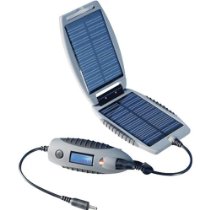
For my needs, the powermonkey and the powermonkey eXplorer fit the bill. Consisting of a small charger and solar slave, the powermonkey eXplorer has an LED on the charger that shows when it’s charging as well as how much charge is left. When kept in just 6 hours of full sunlight, the solar slave will charge the battery/charger pack enough to refuel an iPhone three times. Adapters for power sockets around the world are included in a carry bag. Also provided are adapters for iPod, PSP, mini-USB, standard Nokia and Sony-Ericsson phone charger attachments and many more.

Posted by: Lawrence

Reading Time: < 1 minute

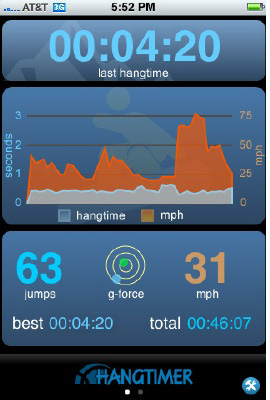
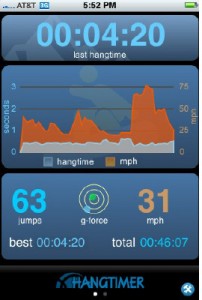
Many moons ago I wrote about the Airpod, a device you wear while snowboarding that measures hang time while pulling airs. Now an application for the iPhone does that and adds a few more bells and whistles to boot.

HangTimer for the iPhone uses the iPhone’s accelerometer and “hairy math” to calculate air time from the point of take-off, speed at take off and location at point of take-off. HangTimer detects your location and provides trail maps, snow reports and resort web cams (when available). For 3G users there is the following added functionality…

  • Detailed speed and location of every jump
  • Link to Google Maps to plot your hits
  • Top Speed at takeoff for every jump

Of course the HangTimer can be used for any sport where it’s safe to have your phone on you (mountain biking for example). I’m interested to know if, when climbing, will the HangTimer measure falling distance (WhipperTimer anyone)?

The full version of HangTimer sells for $9.99. There is a free version which lacks many of the features described above, but does measure hag time and tracks your best jump and total airs per session. Personally I feel this app is well worth it, since I can slip my iPhone in the pockets of unsuspecting ‘big air’ friends only to bring them back down to earth aprés.

Posted by: Lawrence

Reading Time: < 1 minute

For a company as secretive as Apple, it has to be frustrating for Apple that the Cindy Brady of the Web, the US Patent Office, makes it fairly simple to find and view patent filings online.

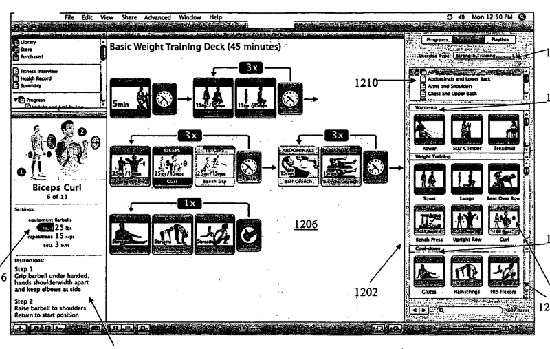
AppleInsider did a little digging and revealed Apple’s patent filings to develop a digital lifestyle fitness companion. Plans include four distinct components that comprise the system, ‘including an iTunes-like software application, hardware-based heart rate and physiological sensors, a rewards tracker, and a component to facilitate synchronous group activities.’

The system asks a series of lifestyle questions; what your fitness goals are, personal and family health history (HIPAA are you listening?). Once the data is collected a fitness regimen specific to the user is created. There are plans for one or more integrated physiological sensors. These could be built-into headphones or in a ‘sling’ which may not only read heart rate, but hold the iPod/iPhone during a workout.

There are a number of interesting screen shots on the AppleInsider Web site; a fitness model demonstrating proper technique, a tick list of exercises for a particular workout and others.

Source: Apple Insider