Rants, raves and other off topic nonsense.

Reading Time: < 1 minute

As of November 2011, Bitness has been bringing you their fresh take on fitness gadgets and gear for the past 5 years. We’ve tested products for runners, swimmers, snowboarders, cyclists and survivalists alike. Starting in November 2011,  we’ll switch focus to what many call action sports or adventure sports. These sports include surfing, snowboarding, skateboarding, climbing, kayaking and other pursuits such as BASE jumping, diving, survivalism and more.

Franz Circa 1987

Because the sports that generally fall under the action or adventure moniker are our true passion (we’ve been either racing BMX or skating ramps and snowboarding for 30 years – not collectively – 30 years for each of us!), we’re calling them core sports. Deal with it.

We’re pumped to share some of the products we’ve been testing and look forward to hearing your thoughts and having you share your experiences as well. We’re leaving all the old posts in there for archival purposes, so if you like reading about a heart rate monitor from 2007, go for it.

Also, to commemorate our 5 year anniversary this November, we’re finally unveiling a logo – we’ve never had one of those and we found a cool design firm to create it for us.

Finally, in addition to changes you will see on the pages of Bitness, we’ve moved hosts and have a whole bunch of crap to sort-out on the back-end – thanks for your patience!

Posted by: Lawrence

Reading Time: < 1 minute

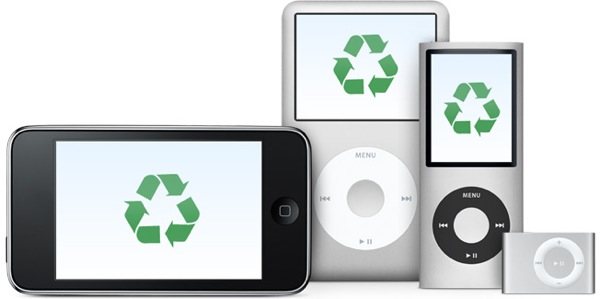
Over the years bitness.com has run a series of articles on gadget recycling and greener gadgets.

Since many of you likely received new and improved heart rate monitors, phones and other gadgets this holiday season, you might be faced with the dilemma of what to do with older electronics you no longer need?

The US Environmental Protection Agency (EPA)* provides information on where to donate or recycle old computer and other electronic products in your area. So if you can’t sell it on eBay or pass it down to a friend/family member, do the right thing and find a local donation or recycling center in your area through the EPA.

Happy Holidays!

* UK readers can look into programs such as MirrorGoGreen, or Google ‘gadget recycling.’ Readers in other countries are encouraged to do the same!

Reading Time: 4 minutes

I was lucky enough to enjoy 3 early powder days last week in Snowbird, Utah. The conditions were not only amazing for early December, they were amazing for any day of any month. But more than fresh lines, blue skies and incredible terrain, what got me stoked the most was sharing it with two friends.

Copyright Justin Cash www.justincash.com

That’s the thing about about Stoke – it’s way better when shared with friends. Two friends that clearly understand this concept are Justin Cash (Woodstock, VT) and Mike Horn (Crested Butte, CO). After several years working together as photographer and writer in the outdoor industry, these stoke enthusiasts decided to launch their own media company to share the stoke and StokeLab.com was born.

In this interview, Justin and Mike share what get’s them stoked, how to capture those moments and what StokeLab does to evangelize the masses by spreading the stoke.

What gets you [StokeLab] stoked?
Spreading stoke far and wide, interacting with our readers/viewers, and putting out a kick-ass product with blood, sweat and tears – okay, nobody’s cried yet, but stoke never sleeps so it’s a lot of work. It’s really gratifying for us to create an alternative stoke-filled universe, and add at least a few positive, inspiring minutes to peoples’ lives.

With two issues under your belt you wowed us with photography and insightful stories. What’s the response been like?
Well, if we’re “wowing” people as you say, than that kind of response is all we could hope for. We’ve received a lot of compliments from a diverse group of readers, and feel we’re accomplishing our mission, or at least are on our way there.

How long does it take to produce a single issue and how often can we expect to see new issues?
New issue every two months, and each issue always takes longer than we plan for – the ideas come first, then we have to convert those ideas into stories, which requires shooting/requesting photos, assigning and editing stories, layout and design, and so on.

Can we ever expect to see Stokelab in print? Is that even a goal of yours?
“Never say never, but print is not our focus right now. Our goal is to continue refining the digital media experience, to make it more interactive and aesthetic. That said, Stokelab will evolve with its readership, and if our readers demand a print magazine down the line than it’s something we’d have to at least consider. But for now we’re capitalizing on the advantages of digital distribution and production, namely, delivering the magazine and all our content for free.

Bitness founder Lawrence Zevon gets methodical 25 years ago. Stokelab founder Justin Cash (seated on right with cap) clearly stoked! Photo by Jason Gould

With Stokelab it’s evident you practice what you preach. What are some of your favorite adventure sports and how did you come to discover them?
Justin – “I’d say my longest running passion would have to be snowboarding. I might even credit you, Larry (bitness.com founder), with turning me on to snowboarding back in ’85-’86. You showed it to Jason Gould and I, when I saw his red and black Burton Elite 140, I knew right then and there I needed one. More recently I’ve been enjoying fly fishing quite a bit in the summer (not so extreme). This winter I am planning on getting into SnoBlading, the sport has kinda died out a little, but I’m on a one-man mission to bring it back to the slopes.”

Mike – “Snowboarding is at the top of my list as well, with mountain biking a close second. I love surfing also but am not very good—at all. Being landlocked in Colorado doesn’t get you much wave time. My first snowboard was a Craig Kelly Air I bought at a thrift store for $15, with bindings. Still got it.

Is there any user-generated content at Stokelab, or do you generally work with select contributors?
We’re just getting started, and are very fortunate to have a bunch of contributors delivering top-level stories, imagery and video content. With two issues out, we’re also receiving more queries from writers and photographers looking to get involved. As for user-generated content, that is on our radar and we are always making efforts to interact with our readers as much as possible. We recently gave away a season pass to Jay Peak Resort, and asked our viewers to submit their stories of stoke, for example.

What are some tips for the amateur photographer to capture great adventure pics like we see on Stokelab.com and justincash.com?
Thanks for the compliment. Technically, I would suggest searching for cool and interesting angles, try to get real close to the action, or climb a tree to get a different perspective. Also, I would add, don’t be afraid to direct the athletes, tell them exactly what you are trying to create and exactly where the peak action needs to be. This will greaten your chances of nailing a banger image. In the end, I’d say shoot as much as you can and make sure you are enjoying what you are shooting – if you are your stoke will show through in your work.


Reading Time: 3 minutes

As a triathlete, you kind of have to get used to early mornings. Most races will start pretty early, and you’ll probably find you have to get up at ridiculously early times to get to the races on time (but, like, how do you get a decent night’s sleep when you have to get up at 2am for a race?). It’s also generally a good idea to try and fit in your longer training sessions early in the day, so you get it out of the way and still have time for the other people/things in your life.

On top of that, as a triathlon coach, I am still getting used to the fact that people mostly want to be coached either very early in the morning or later in the evening.   Getting up at 4-4:30am 3 days a week so I can do my job still takes a lot out of me, especially when you add 20 minutes up to 1.5 hours travel time each way to coach these sessions.  But, it’s still my favorite time of the day.

I know it’s not just a triathlon thing, I know lots of people like to get up early to catch the good waves, the fresh powder, the greens that have not been trampled.  But, here are some of my observations and meditations:

  • I LOVE riding around the streets of a big sprawling city like London or Chicago or Beijing when they are empty and you feel like you own the place or you are the star of post-apocalyptic movie (without the zombies or robots)
  • Foxes live in a lot of the parks in London, and the only time you will see them is in the very early hours of the morning , and they are surprisingly shy and tame-looking


  • The sight of rabbits darting into the hedges, scurrying across a field, or just plain running away as you approach is probably THE most enchanting sight I have ever seen
  • Geese and swans, however, can be vicious bastards if disturbed in the middle of their early morning rituals
  • There are still a surprising number of electric milk floats working all over London
  • People who get up and go to work in the early hours of the morning tend to be the most chilled out and approachable people, everywhere I have ever been (US, Europe and Asia)
  • Getting up early in the winter time, on a dark and cold morning, is especially awesome, because even fewer people do it, and you feel like you belong to a very elite club

  • If you are not a fan of sun-rises, it’s probably because you haven’t experienced enough of them, so force yourself to get up and out that early some time and you might just surprise yourself with how much you enjoy it
  • I like to be reminded that once I was the sort of person who stayed up until 5:30am and then came home from fantastic nights out, and now I am seeing it from a different side

I guess that’s the part I like the best about 5:30am: the chance to see things from a very different perspective, maybe surprise yourself, maybe experience something really unique. While you avoid the broken glass and drunk drivers.

Please feel free to add your comments and meditations below.

Reading Time: < 1 minute

Last minute shopping for Mother’s Day? There are a number of gadgets out there for the tech-savvy mother and at a variety of price points depending on your budget. ABC News has done a nice job compiling a list of gadgets for Moms, proving that Dad’s aren’t the only ones looking to geek-out. In fact it’s estimated that more than $906m will be spent on consumer electronics for Mother’s Day this year.

Check out the video below for demonstrations and descriptions of some of the hottest Mother’s Day gadgets this year, including…

Eye-Fi 4GB WiFi – $49.99
Automatically uploads to photo sharing site (e.g. Flickr) and keep SD cards free for new pictures

Kodak Digital Picture Frame – $129 (Pulse)
Email pictures to the frame’s personal email address – couldn’t be easier

Asus Skype Video Phone Touch – $199
No computer required, plug it in, attach it to your home network and enjoy

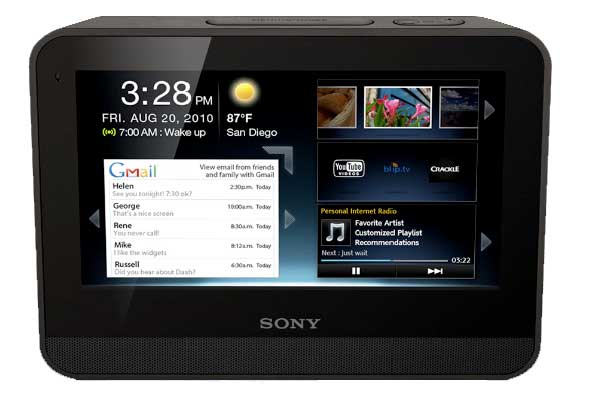
Sony dash – $199
Also hooks into home WiFi. Provides news, weather, traffic and more. The ideal alarm clock, you can link to the Pandora music site to wake-up to your favorite music.

Posted by: Jason

Reading Time: < 1 minute

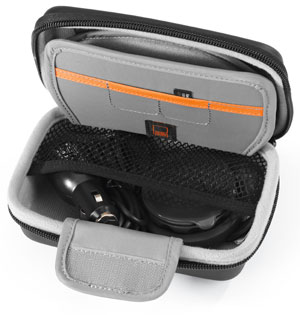
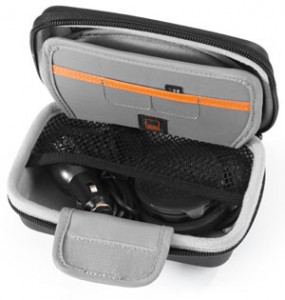
Given the cost of portable gadgets, it’s a good idea to protect your investment with a well constructed and functional case. Writing about a case in a tech article may seem a stretch to some, but the Lowepro 4.3 Navi Shield falls squarely under the category of gear with it’s hard, molded-foam exterior and soft Nylon Tricot 200d lining.

The 4.3 Navi Shield provides the necessary protection for my Garmin Nuvi and the compact size allows the case to be hidden in the center console (or a glove box). It also offers space for the charger cord and two extra SD cards and has a built-in microfiber cloth to clean the delicate touch screen.

It weighs very little (0.2lbs/0.1kg), so bringing the Nuvi on flights has helped saved some money when renting a car (and not needing the GPS they offer). If you own a 3.5 to 4.3-in portable navigation system consider the Lowepro 4.3 Navi Shield.

Size (Interior):
5.1W X 0.9D X 3.1H in./
13.0 X 2.3 X 8.0 cm

Size (Exterior):
6.5W X 2.4D X 4.5H in./
16.5 X 6.0 X 11.5 cm

Posted by: Lawrence

Reading Time: 3 minutes

I was an early iPhone adopter – before the App store and just stoked on the idea that I had a cool phone and a way to browse the web at decent speeds on a decent-sized screen. The initial gee-whiz of what could be done on the iPhone was soon overshadowed by what it couldn’t do and the lack of certain features continue to stick-out.

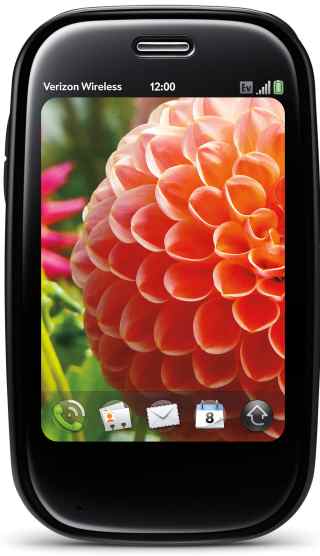
As fast as it looks, the Palm Pre Plus

By far the most glaring omission with the iPhone is the inability to tether it to a computer. While this isn’t a limitation of the iPhone itself (it’s more like a disabled feature) it leaves many, including myself, looking for alternative solutions. The Palm® Pre™ Plus not only let’s you tether (via Bluetooth), but Palm incorporated a mobile hotspot into the Pre which allows as many as 5 concurrent users to jump online.

The Pre is a sleek looking slider phone (keypad slides-out from the bottom) with a built-in camera and flash. It feels nice in your hand and slips easily into your front pocket. It’s so sleek in fact, that it took me a while to find the USB port to charge the phone! I also puzzled over how to close apps (you flick them upwards) and the small keypad gave me fits. When I first receive a gadget I purposely avoid the manual to see how intuitive it is and I have to say the Palm Pre Plus is miles from Apple in regards to ease-of-use.

Voice: In my tests the Palm® Pre™ Plus on the Verizon network performed well, with good sound clarity and clear voice transmission. To dial numbers you use the touchscreen and not the tiny keypad. The Pre worked everywhere I tried it, including spots my iPhone loses coverage. AT&T recently announced plans to spend $18 – $19 billion on network upgrades, but there is far less AT&T coverage in my area than Verizon.

Data: The Palm Pre takes advantage of Verizon EV-DO Rev. A and offers speeds equal or greater than speeds enjoyed on an iPhone 3GS. EV-DO Rev. A data can peak at 3000 kbps, but on average users get around 600Kbps-1400Kbps.

In Rhode Island I enjoyed, on average, 1.50Mb/s download and 0.52Mb/s upload. And in New York City the rates were 1.00Mb/s download and 0.21Mb/s upload. This means in RI I can expect to download a 5MB MP3 file in about 25 seconds, or a 35MB video in 3 minutes – not bad!

If you’re looking for a phone that is very slick looking, offers reliable voice and fast data (for you and up to 5 friends) and you have the patience to read the manual or play with it enough to learn how to use it, then the Palm Pre is a wise choice. Full retail price is listed at $599.99, but with 2yr contract the Palm Pre Plus can be yours for $49.99 (early termination fees do apply). This phone also requires a data package ($29.99 or higher per month). Visit Verizon Wireless for more information.

Specs:
Battery Usage: Up to 330 minutes talk time / Up to 350 hours standby
Dimensions: 3.9″ (H) x 2.3″ x (W) x 0.67″ (D)
Weight: 4.89 oz.
Display: 3.1″(HVGA 480 x 320), 24 bit TFT
Memory: 16GB Flash/512 RAM
Bluetooth® Wireless Technology–(V 2.1+EDR)
3 Megapixel camera with flash
Palm webOS™ platform
Wi–Fi Ready (802.11 b/g)
Music Player for MP3, AAC, AAC+, WAV, AMR, QCELP
Email: Exchange ActiveSync support

Posted by: Lawrence

Reading Time: 2 minutes

FLowTV
The commercial: Great montage of iconic moments captured on TV over the decades.

The product: FloTV, “a dedicated broadcast network of high quality video that emulates broadcast television.” FlowTV sells a 3.5″ touchscreen screen device with 5 hours of watch time and 4GB memory for $199.00 (for a limited time price includes 6 months of service) and $14.99/month thereafter.

iPhone and iTouch users can forgo the extra hardware and soon be able to add a Mophie Juice Pack (an external battery pack) with an embedded FloTV broadcast chip (reported to be available in the first half in 2010). Before purchasing FlowTV, check for coverage in your area.

Vizio
The commercial: Futuristic warehouse where robots collect everything from Beyonce, the gopher from Caddy Shack to YouTube wonder-kid ‘David after Dentist’ and drop them into Vizio’s TRULED chip.

The product: Dubbed “The best of the internet now on your HDTV” this is an HDTV with built-in wireless (802.11n dual-band) and wired networking. Select Vizio models with this functionality will also includes a Bluetooth universal remote control with sliding QWERTY keyboard. Offering what is called the Vizio Internet Apps Platform, users can quickly connect to Flickr, Netflix, Twitter, Amazon, Yahoo and more.

Google
The commercial: Google’s “Parisian Love” ad not only demonstrates what their product is capable of… it demonstrates what it’s capable of! How to convince a French woman you’re a worldly, well read renaissance man by Googling everything you ought to know to get laid. OK, actually this is a heartwarming ad and even though it’s not new, Google was wise to run with it because it’s damn good.

The product: Google search (maybe you’ve heard of it?)

Other technical products advertised during the Superbowl were Intel (yawn), EA (cool), Monster (funny!), GoDaddy (embarrassing) and E*trade (really, the baby… again?).

What were your favorite ads (techie or otherwise)? Leave them in the Comments below…

Posted by: Lawrence

Reading Time: < 1 minute

While it’s true the main focus of Bitness is fitness gadgets, we do – from time-to-time – write about gadgets for dogs. Most of these gadgets (like this, this and this) border on animal cruelty, but possible none quite so much as the PooTrap…

Source: Geekologie

Reading Time: < 1 minute

The sun has finally started to shine on the Northeast and people are once again flocking to the beach. Here’s a top 10 list of gadgets worth checking out for planning and making your next trip to the beach.
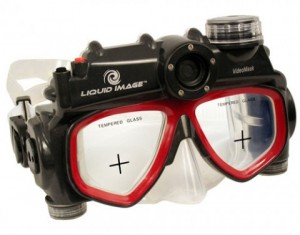
liquid image

1. Long or short board? Learn the conditions before you leave home…
Quicksilver Moondak watch and TideGraph iPhone application (source: Bitness)

2. SPF 30 or 50?
UV Monkey (source: Coolest Gadgets)

3. Calvin Klein USB Sunglasses
(source: Geeky Gadgets)

4. Avoid the rising cost of gas and beach parking…
Dog powered scooter (source: Bitness)

5. You found your spot on the beach, but aren’t looking for any neighbors…
Ecoblaster rechargable air horn (source: craziestgadgets.com)

6. Keep your MP3 player and cell phone running all day…
Powertraveller portable and solar chargers (Providence Gadget Examiner)

7. Give the boys (or the girls) a little sunshine too!
Solar tan-thru suits (source: Solar Tan Thru Suits)

Just because you decided to get wet doesn’t mean you have to leave the gadgets hidden under your baseball cap on the towels (good hiding spot)…
8. Waterproof MP3 player and headphones (source: H20 Audio)

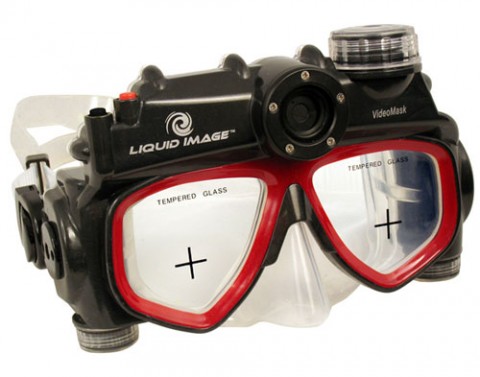
9. Liquid Image UDCM310 diving mask (source: SlashGear)

10. Before you pack-it-in take one last stroll around the beach and let some kook from Jersey pay for your chowder and stuffies…
Metal detecting sandals (source: Providence Gadget Examiner)

Posted by: Lawrence

Reading Time: 3 minutes

There is no denying our infatuation with gadgets is taking it’s toll on the environment. By following the three R’s (reduce, reuse, recycle) that have become synonymous with ‘green’ living, this article helps inform gadget enthusiasts what we can do to tread lightly.

recycle your gadgets

Reduce: energy consumption

While some gadgets can have a positive impact to the environment (for example a GPS device can help reduce fuel consumption), most do not. Energy consumption by gadgets is putting the world on track for 200 new nuclear power plants by 2030! Here are two suggestions on how to take action…

1. Be aware: Google PowerMeter

Tells you how much it costs to make toast, what your TV addiction means to your bank account and which appliance is the biggest energy hog of the bunch (and may need replacing). You can also compare your energy efficiency to similar homes in your neighborhood. Check with your utility company or visit Google for more information.

2. Seek renewable energy sources: Solar, hydro, wind and hand cranks are making leaps and bounds in providing viable energy alternatives to gadget users.

Solar – Harness the suns energy, it’s better for your wallet and the environment
Hydro – Vena Micro-Hydro turbine, take it along on your next campout
Wind – Wind power generators are popping-up in fields, on rooftops and now on handlebars!
Hand cranks – becoming more common on flashlights and radios, but you can also purchase a standalone hand crank to generate power your other mobile gadgets

Reuse: older or broken gadgets

Even with a perfectly good working Blackberry or iPhone, we want the newer model before anyone else – no matter the cost to our bank account or to the environment. That there is nothing wrong with our existing phone doesn’t stop us from replacing it post-haste. A site called ReCellular states that “One in three Americans will replace their cell phones this year, adding to the 500 million unused phones currently waiting to be discarded or recycled.”

Self proclaimed electronic sustainability firm ReCellular allows you to buy, sell and donate old cellular equipment. You can also set-up a donation program through ReCellular in your area as a way to generate revenue while at the same time helping the environment.

myGreenElectronics is another option for reusing or recycling old electronic equipment, including PCs. Through relationships they’ve established with charities, community programs and schools, you can sell or donate equipment no longer needed. Check out the energy calculator on myGreenElectronics and see how much you’re spending to run your gadgets.

When a gadget no longer works many of us toss it and get the new one. But a growing number of people are attempting their own repairs, or creating new devices using the parts contained in broken gadgets. There are groups popping all over the world called Hackerspaces. These community-operated physical places allow people to meet and work on projects together. You’re only limited to your imagination as to what you turn an old cellphone, LCD, washing machine and weed whacker into. Throw those broken gadgets in a box and head down to a Hackerspace near you.

There are magazines and endless links through Google for ways to make use of still functioning components in otherwise broken gadgets. Reuse what you have by selling, donating or converting it into a new gadget entirely.

Recycle: old or broken gadgets

In the United States, about 130,000 computers are thrown out every day. According to the US Environmental Protection Agency (EPA), approximately 18 percent (414,000 tons) of discarded TVs and computer products were collected for recycling in 2007. Many of these devices contain lead, mercury, cadmium and brominated flame retardants which have to be properly discarded. These same devices also contain precious resources such as copper, gold, silver, platinum and palladium which businesses seek to recover for financial gain.

Because some of today’s gadgets are too difficult to open to even attempt repair, many elect to simply discard and replace. There are sites that can help you figure out how to attempt a repair yourself, or you can opt to sell or give away broken gadgets. If you can’t or don’t want to tinker yourself, you may even be able to sell your gadgets on Gazelle or BuyMyTronics or give them away in your local Craigslist’s ‘Free’ area.

Before you toss that old TV, phone or iPod away, visit EPA eCycling to learn about recycling programs in your area. For phones don’t forget to cancel service, delete contacts and (Paris Hilton, this is for you) delete pictures and other personal and sensitive information. Some recycling centers will offer to do this for you for a small fee, but it’s a safer bet if you do it yourself.

Reusing and recycling electronics conserves natural resources, avoids water and air pollution and reduces greenhouse gas emissions created when new products are manufactured. Keep it clean – go green!

Reading Time: < 1 minute

In the past week I’ve had 4 people tell me how grateful they were that I turned them on to Steepandcheap.com. Steep and Cheap sells gear (I’d describe it as general outdoorsy gear) one item at a time until it’s either sold out or times-out, at which point it’s on to the next item.

Steep and Cheap mostly sells-out because the deals are good – usually in the 60% off or more range. Act fast if you see something you like! With back-to-back deals all day long it can get addicting and there’s a number of ways to stay tuned-in to deals that are poppin’ (RSS, sidebar gadgets, plug-ins, email, IM and soon an iPhone app).

I’ve been a Steep and Cheap customer since they started and have seen the concept grow wildly. Sister sites now include…

  • Chain Love for biking gear, including BMX and Mountain biking
  • Bonktown is more for the road cycling enthusiast
  • Tramdock for you two-plankers and especially good deals off-season
  • Brociety caters to snowboarders mostly, again… good off season loot to be had
  • Whiskey Militia is so aggro you probably already know they sell skate and surfing gear. Get some.

Check them out let me know what you think. I’ve only had great experiences with them, even returning gear I decided I didn’t need – they make it easy.

Posted by: Franz

Reading Time: < 1 minute

  1. Siesta Beach in Sarasota, Fla.
  2. Coopers Beach in Southampton, N.Y. (Long Island)
  3. Hanalei Bay in Kauai, Hawaii
  4. Coronado Beach in San Diego
  5. Hamoa Beach in Maui, Hawaii
  6. Main Beach in East Hampton, N.Y. (Long Island)
  7. Cape Hatteras in Outer Banks, N.C.
  8. Cape Florida State Park in Key Biscayne, Fla.
  9. Coast Guard Beach on Cape Cod, Mass.
  10. Beachwalker Park on Kiawah Island, S.C.

What about your favorite beaches? I know Coast Guard Beach and think it compares to a few other New England beaches I frequent.

Source: NY Daily News

Reading Time: < 1 minute

However unintentional, this is shaping up to be ‘Green Week’ on Bitness. Google.org just released a list of partners (typically power companies) from all over the world, who will install ‘smart meters’ that interface with and provide data to Google’s PowerMeter gadget.

The PowerMeter Gadget can tell you how much it costs to make toast, what your TV addiction means to your bank account or if which appliance is the biggest energy hog of the bunch (and may need replacing). You can also compare your energy efficiency to similar homes in your neighborhood. Unfortunately, not every utility company is working with Google.org, but they plan to expand the roll-out of Google PowerMeter later in 2009.

Here’s what one user had to say…

“I put the sound system, DVD player and VCR on power strips. I learned that my computer wasn’t sleeping properly, and started putting it on Standby when not in use. I cleaned the coils in my refrigerator (which hadn’t been cleaned in 15 years! Yikes!). Before I made these changes, my baseline load was around 360 W, afterwards, it was slightly under 200 W – this will save me about $150 / year.”
Alec, Mechanical Engineer

https://youtube.com/watch?v=6Dx38hzRWDQ%26hl

Posted by: Lawrence